# Certificados

<span style="font-size: 12pt; font-family: Arial; color: #666666; background-color: transparent; font-weight: 400; font-style: normal; font-variant: normal; text-decoration: none; vertical-align: baseline; white-space: pre-wrap;">En este módulo podrás hacer una validación sobre el funcionamiento de los sensores o accesorios con los que cuentan tus activos.</span>

##### <span style="font-size: 12pt; font-family: Arial; color: #666666; background-color: transparent; font-weight: bold; font-style: normal; font-variant: normal; text-decoration: none; vertical-align: baseline; white-space: pre-wrap;">Crear un certificado:</span>

- - <span style="font-size: 12pt; font-family: Arial; color: #666666; background-color: transparent; font-weight: bold; font-style: normal; font-variant: normal; text-decoration: none; vertical-align: baseline; white-space: pre-wrap;">Selección de un vehículo: </span><span style="font-size: 12pt; font-family: Arial; color: #666666; background-color: transparent; font-weight: 400; font-style: normal; font-variant: normal; text-decoration: none; vertical-align: baseline; white-space: pre-wrap;">Para crear un certificado, lo primero que debes hacer es seleccionar el activo que deseas certificar, ingresa el nombre de la placa y selecciona el activo. En el segundo recuadro puedes o no, según sea el caso, colocar el número del semi o acoplado del activo, en caso de que cuente con uno.</span>

<span style="font-size: 12pt; font-family: Arial; color: #666666; background-color: transparent; font-weight: 400; font-style: normal; font-variant: normal; text-decoration: none; vertical-align: baseline; white-space: pre-wrap;">Selecciona el botón "Iniciar la verificación de sensores", para verificar los sensores y accesorios con los que cuenta el activo.</span>

<span style="font-size: 12pt; font-family: Arial; color: #666666; background-color: transparent; font-weight: 400; font-style: normal; font-variant: normal; text-decoration: none; vertical-align: baseline; white-space: pre-wrap;"><span style="border: 1pt solid #000000; display: inline-block; overflow: hidden; width: 498px; height: 298px;">![](https://lh4.googleusercontent.com/9f29S556-4Y_jeRhnzT2Z5x0WEy2mjrKjCCCh_WY-tdlzxzEHCKqp1sldB3qTBpJesLTJKS77T-ONQFRPmtgBHMqW0UhhhtZXq21ArinJ9IpAeSI51e9Enl1Y94vhOd3ZGCG3h_K)</span></span>

<span style="font-size: 12pt; font-family: Arial; color: #666666; background-color: transparent; font-weight: 400; font-style: normal; font-variant: normal; text-decoration: none; vertical-align: baseline; white-space: pre-wrap;">Una vez iniciada la verificación, se mostrará el listado con los sensores/accesorios que tiene disponible el activo.</span>

<span style="font-size: 12pt; font-family: Arial; color: #666666; background-color: transparent; font-weight: 400; font-style: normal; font-variant: normal; text-decoration: none; vertical-align: baseline; white-space: pre-wrap;"><span style="border: 1pt solid #000000; display: inline-block; overflow: hidden; width: 352px; height: 421px;">![](https://lh5.googleusercontent.com/xABv-He3EEw7od5Ub2e_X7mThNOiL9ttVAhhX4HfCUB-voxpYJwYXligBKI8bweXQllZ_kCvcZGut_NeylBYuZVI2E2pYHt6dAvPBsVlSF_3vfia7t0hJnir_ShTCwYFsIesGj_W)</span></span>

<span style="font-size: 12pt; font-family: Arial; color: #666666; background-color: transparent; font-weight: 400; font-style: normal; font-variant: normal; text-decoration: none; vertical-align: baseline; white-space: pre-wrap;">Cuando se validen los sensores, podremos obtener el certificado de cobertura de estos. En el certificado se visualizan los datos de la fecha de la consulta, el cliente que emite el certificado, el nombre del usuario que lo ha solicitado, la placa del vehículo, la última ubicación reportada y si tiene información de sensores o no.</span>

<span style="font-size: 12pt; font-family: Arial; color: #666666; background-color: transparent; font-weight: 400; font-style: normal; font-variant: normal; text-decoration: none; vertical-align: baseline; white-space: pre-wrap;">Cuando se presentan sensores activos, se muestra el dato del tipo de sensor, fecha de evento en el que generó datos los sensores/accesorios y la ubicación donde se generó este valor reportado.</span>

<span style="font-size: 12pt; font-family: Arial; color: #666666; background-color: transparent; font-weight: 400; font-style: normal; font-variant: normal; text-decoration: none; vertical-align: baseline; white-space: pre-wrap;">Este mismo certificado se puede descargar en formato PDF</span>

<span style="font-size: 12pt; font-family: Arial; color: #666666; background-color: transparent; font-weight: 400; font-style: normal; font-variant: normal; text-decoration: none; vertical-align: baseline; white-space: pre-wrap;"><span style="border: 0pt solid #021a40; display: inline-block; overflow: hidden; width: 602px; height: 383px;">![](https://lh4.googleusercontent.com/-8Jvn4zy4Ka4JTP0qxtc3AHwUYfCwtqchFcsiZL5JeakGdqw6KMgWwWPfI44DonhSvQKXyPglb1i7hb0jcS-jXJAkb4XVWdmzIKu1LbOIMMp71GD6AYIFhrUR1TozW7y91zuzsjU "obtener certificado")</span></span>

##### <span style="font-size: 12pt; font-family: Arial; color: #666666; background-color: transparent; font-weight: bold; font-style: normal; font-variant: normal; text-decoration: none; vertical-align: baseline; white-space: pre-wrap;">Consultar certificado:</span>

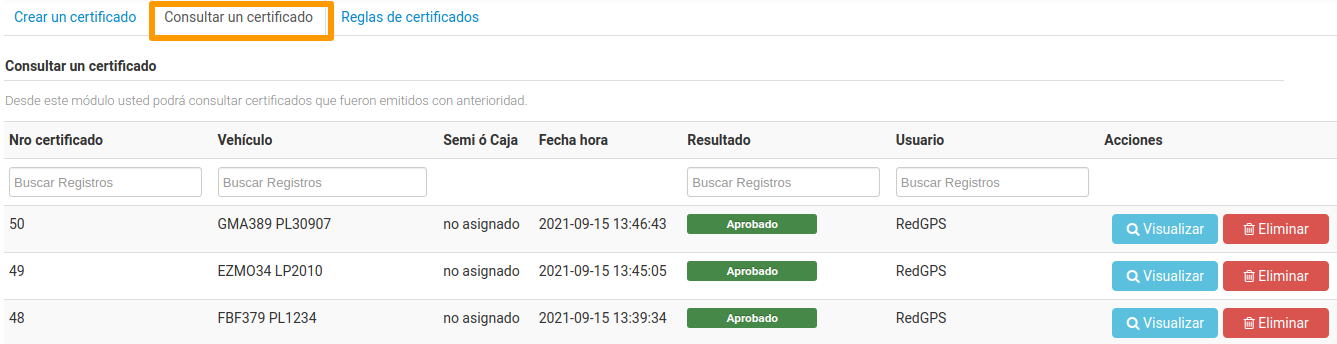
<span style="font-size: 12pt; font-family: Arial; color: #666666; background-color: transparent; font-weight: 400; font-style: normal; font-variant: normal; text-decoration: none; vertical-align: baseline; white-space: pre-wrap;">En esta segunda pestaña se listan los certificados generados con anterioridad; pudiendo visualizar o eliminar algún certificado específico.</span>

<span style="font-size: 12pt; font-family: Arial; color: #666666; background-color: transparent; font-weight: 400; font-style: normal; font-variant: normal; text-decoration: none; vertical-align: baseline; white-space: pre-wrap;"><span style="border: 1pt solid #000000; display: inline-block; overflow: hidden; width: 602px; height: 155px;">![](https://lh4.googleusercontent.com/VAf0YCPovEuz2C6yWnnzmgfy2QcNbxAMysavCw_zy8lRRv15zTl7IvCiCWldzL4HdHG6booRSxhSm8GaXjeRervPMdj_83c10NKXOQdoTCuOlN7BNm4qE5rZ8kBHZtesChMyIGNY)</span></span>

##### <span style="font-size: 12pt; font-family: Arial; color: #666666; background-color: transparent; font-weight: bold; font-style: normal; font-variant: normal; text-decoration: none; vertical-align: baseline; white-space: pre-wrap;">Reglas de certificados:</span>

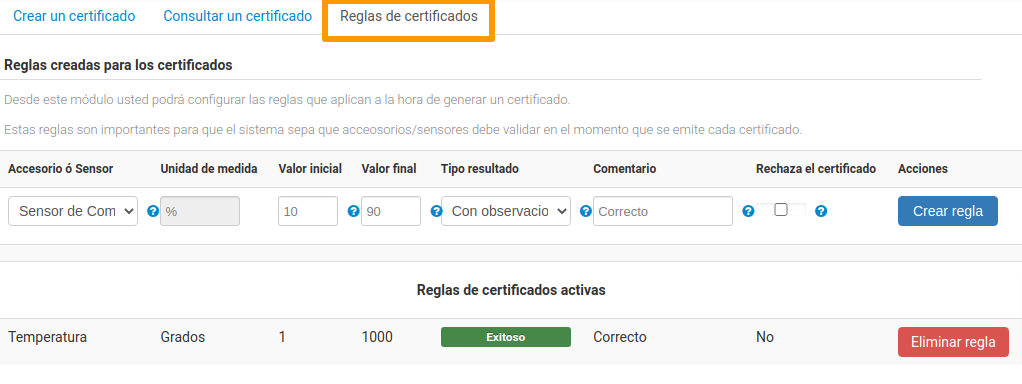
<span style="font-size: 12pt; font-family: Arial; color: #666666; background-color: transparent; font-weight: 400; font-style: normal; font-variant: normal; text-decoration: none; vertical-align: baseline; white-space: pre-wrap;">En la última pestaña podrás configurar reglas para comprobar la acción de un accesorio o sensor.</span>

<span style="font-size: 12pt; font-family: Arial; color: #666666; background-color: transparent; font-weight: 400; font-style: normal; font-variant: normal; text-decoration: none; vertical-align: baseline; white-space: pre-wrap;">Pasos para crear un regla: </span>

- - <span style="font-size: 12pt; font-family: Arial; color: #666666; background-color: transparent; font-weight: 400; font-style: normal; font-variant: normal; text-decoration: none; vertical-align: baseline; white-space: pre-wrap;">Primero debes seleccionar que tipo de accesorio o sensor se añadirá a la regla.</span>
    - <span style="font-size: 12pt; font-family: Arial; color: #666666; background-color: transparent; font-weight: 400; font-style: normal; font-variant: normal; text-decoration: none; vertical-align: baseline; white-space: pre-wrap;">Después, debes indicar el valor inicial y final de la verificación. Dependiendo del tipo de sensor que se seleccione, será el valor utilizado, por ejemplo: si seleccionas sensor de combustible el valor deberá ser en porcentaje de combustible, si es temperatura deberán ser grados, o si es un sensor de ignición el valor serán minutos. Estos valores se utilizan para que dicha condición se cumpla o se deje con observaciones. </span>
        
        
        - <span style="font-size: 12pt; font-family: Arial; color: #666666; background-color: transparent; font-weight: 400; font-style: normal; font-variant: normal; text-decoration: none; vertical-align: baseline; white-space: pre-wrap;">Esta regla va en función de lo que quieres manejar como parámetro.</span>
        - <span style="font-size: 12pt; font-family: Arial; color: #666666; background-color: transparent; font-weight: 400; font-style: normal; font-variant: normal; text-decoration: none; vertical-align: baseline; white-space: pre-wrap;">Ejemplo: Aplicar la regla cuando el último reporte de ubicación del activo está entre 0 y 5 minutos y el resultado será exitoso si el último reporte fue de 5 minutos hacia atrás. Es recomendado usar 00 para indicar infinito, siguiendo este mismo ejemplo, si queremos aplicar la regla cuando el último reporte de ubicación del activo está entre 5 a 10,000 minutos, este último valor recomendamos que se ponga 00, el tipo de resultado para este caso será con observaciones y podemos usar el campo de rechazar el certificado.</span>
        - <span style="font-size: 12pt; font-family: Arial; color: #666666; background-color: transparent; font-weight: 400; font-style: normal; font-variant: normal; text-decoration: none; vertical-align: baseline; white-space: pre-wrap;">Estos ejemplos al crear certificado, se usaran dichas reglas siempre que se apliquen.</span>
    - <span style="font-size: 12pt; font-family: Arial; color: #666666; background-color: transparent; font-weight: 400; font-style: normal; font-variant: normal; text-decoration: none; vertical-align: baseline; white-space: pre-wrap;">Según sea la situación selecciona un resultado, el cual puede ser:</span>
        - <span style="font-size: 12pt; font-family: Arial; color: #666666; background-color: transparent; font-weight: 400; font-style: italic; font-variant: normal; text-decoration: none; vertical-align: baseline; white-space: pre-wrap;">Exitoso,</span><span style="font-size: 12pt; font-family: Arial; color: #666666; background-color: transparent; font-weight: 400; font-style: normal; font-variant: normal; text-decoration: none; vertical-align: baseline; white-space: pre-wrap;"> si la acción se desarrolló de manera correcta.</span>
        - <span style="font-size: 12pt; font-family: Arial; color: #666666; background-color: transparent; font-weight: 400; font-style: italic; font-variant: normal; text-decoration: none; vertical-align: baseline; white-space: pre-wrap;">Con observaciones,</span><span style="font-size: 12pt; font-family: Arial; color: #666666; background-color: transparent; font-weight: 400; font-style: normal; font-variant: normal; text-decoration: none; vertical-align: baseline; white-space: pre-wrap;"> si hubo algún detalle importante de mencionar.</span>
        - <span style="font-size: 12pt; font-family: Arial; color: #666666; background-color: transparent; font-weight: 400; font-style: italic; font-variant: normal; text-decoration: none; vertical-align: baseline; white-space: pre-wrap;">Con errores,</span><span style="font-size: 12pt; font-family: Arial; color: #666666; background-color: transparent; font-weight: 400; font-style: normal; font-variant: normal; text-decoration: none; vertical-align: baseline; white-space: pre-wrap;"> si la acción no se llevó a cabo como debía.</span>
    - <span style="font-size: 12pt; font-family: Arial; color: #666666; background-color: transparent; font-weight: 400; font-style: normal; font-variant: normal; text-decoration: none; vertical-align: baseline; white-space: pre-wrap;">Escribe un comentario si es necesario en relación al resultado, este se mostrará en el certificado.</span>
    - <span style="font-size: 12pt; font-family: Arial; color: #666666; background-color: transparent; font-weight: 400; font-style: normal; font-variant: normal; text-decoration: none; vertical-align: baseline; white-space: pre-wrap;">Por último, selecciona si se rechaza este certificado para esa regla.</span>

<span style="font-size: 12pt; font-family: Arial; color: #666666; background-color: transparent; font-weight: 400; font-style: normal; font-variant: normal; text-decoration: none; vertical-align: baseline; white-space: pre-wrap;">En este mismo listado, se muestran todas las reglas que se han creado y podremos eliminarlas.</span>

<span style="font-size: 12pt; font-family: Arial; color: #666666; background-color: transparent; font-weight: 400; font-style: normal; font-variant: normal; text-decoration: none; vertical-align: baseline; white-space: pre-wrap;"><span style="border: 1pt solid #000000; display: inline-block; overflow: hidden; width: 602px; height: 227px;">![](https://lh6.googleusercontent.com/B7OZ_mgFvbYr5q2BYDnBXoblu-POEza57bKWMFA5OrColBoMOlCv6JoccAFp4PjfqeqoypWhtTNi_wEIsWPA0UpY_OfEnwwUZ-I32eBxcfxy-pgpxo9ITDhfQK-wYpbdV-cK2xhX)</span></span>

<span style="font-weight: normal;"></span>