# OnRoad

# Inicio

<span style="font-size: 12pt; font-family: Arial; background-color: transparent; font-weight: 400; font-style: normal; font-variant: normal; text-decoration: none; vertical-align: baseline; white-space: pre-wrap;">Se mostrará la información correspondiente de los viajes que están en proceso y los que han finalizado durante el transcurso del día. Esta pestaña tendrá un contador en la parte superior derecha, que actualizará la información cada minuto.</span>

- - - <span style="font-size: 12pt; font-family: Arial; background-color: transparent; font-weight: 400; font-style: normal; font-variant: normal; text-decoration: none; vertical-align: baseline; white-space: pre-wrap;">Viajes en proceso: Se mostrarán los viajes que están siendo efectuados en el día.</span>
        - <span style="font-size: 12pt; font-family: Arial; background-color: transparent; font-weight: 400; font-style: normal; font-variant: normal; text-decoration: none; vertical-align: baseline; white-space: pre-wrap;">Viajes finalizados: Se mostrarán los viajes que hayan concluido en el transcurso del día.</span>
        - <span style="font-size: 12pt; font-family: Arial; background-color: transparent; font-weight: 400; font-style: normal; font-variant: normal; text-decoration: none; vertical-align: baseline; white-space: pre-wrap;">Vehículos Inactivos: Hace referencia al tiempo (en horas) transcurrido desde el último viaje realizado por un activo.</span>

<span style="font-size: 12pt; font-family: Arial; color: #6c757d; background-color: transparent; font-weight: 400; font-style: normal; font-variant: normal; text-decoration: none; vertical-align: baseline; white-space: pre-wrap;"><span style="border: 0pt solid #021a40; display: inline-block; overflow: hidden; width: 602px; height: 271px;">![](https://lh4.googleusercontent.com/piylPY9z4L6Rp-hLtRJfksY8fdioDqPStjPDcu6IMpK8QEUGrNhh-DEmU8mBBjVHqBIkql8ExpYQZSw_ebiqqF4rPO5QrGHj1gnT0CcXuRZO8Ak91omJGq1LDbGxPt_SUO2n9psm "enter image title here")</span></span>

# En proceso

<span style="font-size: 12pt; font-family: Arial; color: #6c757d; background-color: transparent; font-weight: 400; font-style: normal; font-variant: normal; text-decoration: none; vertical-align: baseline; white-space: pre-wrap;">En la pestaña </span><span style="font-size: 12pt; font-family: Arial; color: #6c757d; background-color: transparent; font-weight: 400; font-style: italic; font-variant: normal; text-decoration: none; vertical-align: baseline; white-space: pre-wrap;">"En proceso"</span><span style="font-size: 12pt; font-family: Arial; color: #6c757d; background-color: transparent; font-weight: 400; font-style: normal; font-variant: normal; text-decoration: none; vertical-align: baseline; white-space: pre-wrap;"> se muestra la información de las entregas iniciadas y que están en proceso en el día. Se mostrará la información de salida del activo, llegada, la demora que ha tenido en cada punto de entrega, etc. Esta información se podrá descargar en un documento Excel.</span>

<span style="font-size: 12pt; font-family: Arial; color: #6c757d; background-color: transparent; font-weight: 400; font-style: normal; font-variant: normal; text-decoration: none; vertical-align: baseline; white-space: pre-wrap;"><span style="border: 0pt solid #021a40; display: inline-block; overflow: hidden; width: 602px; height: 195px;">![](https://lh3.googleusercontent.com/lZlUflGJEq0AmmnKYIpOOR6TC06AKDH1ah9kai3mE-DijE4cLlIN0ad822l07HUH4aXF498qmio95iy4IXIjOR8BeimY3tqrmhuRK8hRYQyPSkN7MrfZqrw4n-snPcgMNgMKH_XT "enter image title here")</span></span>

#### <span style="font-size: 12pt; font-family: Arial; color: #666666; background-color: transparent; font-weight: 400; font-style: normal; font-variant: normal; text-decoration: none; vertical-align: baseline; white-space: pre-wrap;">Configuración: En esta sección podrá configurar los aspectos básicos para el ruteo libre, así como también crear etiquetas de tiempos mínimos y máximos en las entregas.</span>

#### <span style="font-size: 12pt; font-family: Arial; color: #666666; background-color: transparent; font-weight: 400; font-style: italic; font-variant: normal; text-decoration: none; vertical-align: baseline; white-space: pre-wrap;">Lugares / Activos:</span><span style="font-size: 12pt; font-family: Arial; color: #666666; background-color: transparent; font-weight: 400; font-style: normal; font-variant: normal; text-decoration: none; vertical-align: baseline; white-space: pre-wrap;"> Ingrese la información básica de la ruta (umbral, tiempo detenido, lugar inicial / final)</span>

- - - <span style="font-size: 11pt; font-family: Arial; color: #666666; background-color: transparent; font-weight: 400; font-style: normal; font-variant: normal; text-decoration: none; vertical-align: baseline; white-space: pre-wrap;">Umbral de llegada: Determinado por una Geocerca, aplicada en metros. Por ejemplo: 20 metros (recordemos que un GPS tiene regularmente una tolerancia de 20 metros de error)</span>
        - <span style="font-size: 11pt; font-family: Arial; color: #666666; background-color: transparent; font-weight: 400; font-style: normal; font-variant: normal; text-decoration: none; vertical-align: baseline; white-space: pre-wrap;">Tiempo detenido: Tiempo aproximado que estaría el activo realizando la entrega.</span><span style="font-size: 11pt; font-family: Arial; color: #666666; background-color: transparent; font-weight: 400; font-style: normal; font-variant: normal; text-decoration: none; vertical-align: baseline; white-space: pre-wrap;">  
            </span><span style="font-size: 11pt; font-family: Arial; color: #666666; background-color: transparent; font-weight: 400; font-style: italic; font-variant: normal; text-decoration: none; vertical-align: baseline; white-space: pre-wrap;">Ejemplo: 2 min.</span>
        - <span style="font-size: 11pt; font-family: Arial; color: #666666; background-color: transparent; font-weight: 400; font-style: normal; font-variant: normal; text-decoration: none; vertical-align: baseline; white-space: pre-wrap;">Lugar de Inicio / Fin</span><span style="font-size: 11pt; font-family: Arial; color: #666666; background-color: transparent; font-weight: 400; font-style: normal; font-variant: normal; text-decoration: none; vertical-align: baseline; white-space: pre-wrap;">  
            </span><span style="font-size: 11pt; font-family: Arial; color: #666666; background-color: transparent; font-weight: 400; font-style: normal; font-variant: normal; text-decoration: none; vertical-align: baseline; white-space: pre-wrap;">Inicio: De dónde partirá el vehículo</span>
        - <span style="font-size: 11pt; font-family: Arial; color: #666666; background-color: transparent; font-weight: 400; font-style: normal; font-variant: normal; text-decoration: none; vertical-align: baseline; white-space: pre-wrap;">Fin: A dónde llegará el vehículo (puede ser el mismo que el inicio)</span>
        - <span style="font-size: 11pt; font-family: Arial; color: #666666; background-color: transparent; font-weight: 400; font-style: normal; font-variant: normal; text-decoration: none; vertical-align: baseline; white-space: pre-wrap;">Clientes / lugares: Son los lugares o geocercas que se deben visitar, el orden no importa. Es importante mencionar que estos clientes o lugares ya se han creado en la plataforma posteriormente.</span>
        - <span style="font-size: 11pt; font-family: Arial; color: #666666; background-color: transparent; font-weight: 400; font-style: normal; font-variant: normal; text-decoration: none; vertical-align: baseline; white-space: pre-wrap;">Activos: Son los vehículos que van a realizar este recorrido</span>

<span style="font-size: 12pt; font-family: Arial; color: #6c757d; background-color: transparent; font-weight: 400; font-style: normal; font-variant: normal; text-decoration: none; vertical-align: baseline; white-space: pre-wrap;">Una vez seleccionada la información, haga clic en el botón </span><span style="font-size: 12pt; font-family: Arial; color: #6c757d; background-color: transparent; font-weight: 400; font-style: italic; font-variant: normal; text-decoration: none; vertical-align: baseline; white-space: pre-wrap;">"Guardar".</span>

<span style="font-size: 12pt; font-family: Arial; color: #6c757d; background-color: transparent; font-weight: 400; font-style: italic; font-variant: normal; text-decoration: none; vertical-align: baseline; white-space: pre-wrap;"><span style="border: 0pt solid #021a40; display: inline-block; overflow: hidden; width: 602px; height: 635px;">![](https://lh3.googleusercontent.com/gLRVuDN0T1Ei4rc1jtw6fmr2CXYWCg2vlpXcDAynYRmFnh-no-GS8sa_MOVThxufhqb0SHbqjdM1UpoapCuRUolW7Ac32D_5pePww-zgLyxtpmULkHbzD7PBYouzQ5kDM-w_f3aB "enter image title here")</span></span>

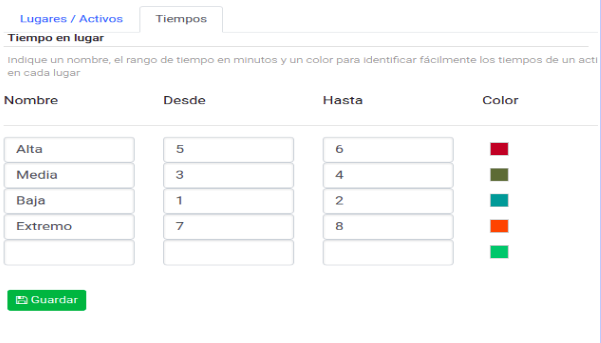
<span style="font-size: 12pt; font-family: Arial; color: #6c757d; background-color: transparent; font-weight: 400; font-style: normal; font-variant: normal; text-decoration: none; vertical-align: baseline; white-space: pre-wrap;">Tiempos: Se configura el tiempo mínimo o máximo que se deberá tener en cada parada que realicen los activos. Se podrán asignar colores a determinado tiempo, esto ayudará a identificar fácilmente esta información en los reportes que se generen posteriormente.</span>

<span style="font-size: 12pt; font-family: Arial; color: #6c757d; background-color: transparent; font-weight: 400; font-style: normal; font-variant: normal; text-decoration: none; vertical-align: baseline; white-space: pre-wrap;"><span style="border: 0pt solid #021a40; display: inline-block; overflow: hidden; width: 601px; height: 343px;">![](https://lh6.googleusercontent.com/2LIwkyHLPvDczNJY6zSRlIoZQbm_q4XZVn-nq0yWesDbP0uY1-iwQdD5ZK4-vPLgm7atotirU77PE7ep40NfxM2P9TrdqTIJwC3L2MJlMIJhPLStdd3vlHRRVxpACq_7AyCRRAj6 "enter image title here")</span></span>

# Historial

<span style="font-size: 12pt; font-family: Arial; background-color: transparent; font-weight: 400; font-style: normal; font-variant: normal; text-decoration: none; vertical-align: baseline; white-space: pre-wrap;">Se muestra la información de las entregas ya realizadas. El rango de fecha para la consulta se podrá seleccionar en Fecha inicio y Fecha fin. Esta información se puede descargar en un documento Excel.</span>

<span style="font-size: 12pt; font-family: Arial; color: #6c757d; background-color: transparent; font-weight: 400; font-style: normal; font-variant: normal; text-decoration: none; vertical-align: baseline; white-space: pre-wrap;"><span style="border: 0pt solid #021a40; display: inline-block; overflow: hidden; width: 602px; height: 145px;">![](https://lh6.googleusercontent.com/11erDp9reCDJVfdS4h1Ms9cxLf2LgbTXsW7TVQvAFb-wmPSHJxlR_hFA3MXDHwHZ-iadYuUx6BSf33E4Gi46lmtQODhpx79OVM6viUzj2vuqQ4xxrSZurtD43ah6_uP0_c5IoIYk "enter image title here")</span></span>

<span id="bkmrk--1" style="font-weight: normal;">  
  
</span>