# Panel de monitoreo

<span style="font-weight: 400;">Al ingresar a la plataforma **OnPartners**, podrás visualizar el **Panel de monitoreo:**</span>

<span style="font-weight: 400;"><span id="bkmrk--9" style="font-weight: normal;"><span style="font-size: 12pt; font-family: Arial; color: #333333; background-color: transparent; font-weight: 400; font-style: normal; font-variant: normal; white-space: pre-wrap;"><span style="border-width: initial; border-style: none; display: inline-block; overflow: hidden; width: 602px; height: 272px;">![](https://lh3.googleusercontent.com/VFtA7JmMvYSh-LSpLL-EFgp1BuQ5tDvW5p3nY6GgFJjqk1sGmzI8GYfSCXGao8PqtPZwk8UvL-OEL13v3ysy97mhmUAeTTs4iJ6GfLnFRKe3d4FF028fkcQ6J9s3IKiTwo5VxdfZ)</span></span></span></span>

## <span style="font-size: 16pt; font-family: Arial; color: #333333; background-color: transparent; font-weight: 400; font-style: normal; font-variant: normal; text-decoration: none; vertical-align: baseline; white-space: pre-wrap;">Resumen de tu cuenta</span>

<span style="font-size: 12pt; font-family: Arial; color: #333333; background-color: transparent; font-weight: bold; font-style: normal; font-variant: normal; text-decoration: none; vertical-align: baseline; white-space: pre-wrap;"><span style="border: 0pt solid #021a40; display: inline-block; overflow: hidden; width: 602px; height: 35px;">![](https://lh5.googleusercontent.com/IXi4JZ511Wl0qvCYZYMUUrLE-fnlvXgLnOBzH_2rxjSTTvlKK2pjhtReSc82_zHdQ0WVgK4rS7DHjjohALOWjNoXIOmVTt0PDMm56LlucdpgZ5xHu8VSC2hT_LuRMWavBAw7fgeP "enter image title here")</span></span>

<span style="font-size: 12pt; font-family: Arial; color: #333333; background-color: transparent; font-weight: 400; font-style: normal; font-variant: normal; text-decoration: none; vertical-align: baseline; white-space: pre-wrap;">La información que se muestra en esta sección es: el número tarjetas SIM, la cantidad de licencias, los clientes activos, cantidad de Activos y los equipos existentes en tu cuenta. Al hacer clic en cada una de las categorías anteriores, podrás visualizar el **Reporte: Equipo - Activo - Cliente**</span>

### <span style="font-size: 13.999999999999998pt; font-family: Arial; color: #4a86e8; background-color: transparent; font-weight: bold; font-style: normal; font-variant: normal; text-decoration: none; vertical-align: baseline; white-space: pre-wrap;">Reportes de equipos</span>

<span style="font-size: 12pt; font-family: Arial; color: #333333; background-color: transparent; font-weight: 400; font-style: normal; font-variant: normal; text-decoration: none; vertical-align: baseline; white-space: pre-wrap;">Desde esta sección observaremos la cantidad de reportes recibidos de cada uno de nuestros equipos ordenados de mayor a menor. Podrás observar una línea discontinua roja que marca el límite de 5000 reportes diarios que permite la plataforma, en caso de exceso comuníquese con su Account Manager para solucionarlo.</span>

<span style="font-size: 12pt; font-family: Arial; color: #333333; background-color: transparent; font-weight: 400; font-style: normal; font-variant: normal; text-decoration: none; vertical-align: baseline; white-space: pre-wrap;"><span style="border: none; display: inline-block; overflow: hidden; width: 602px; height: 231px;">![](https://lh3.googleusercontent.com/sD_A48kBX4hgFdLzBoeSXDwbyLGmEShvpZ-yebIg-rRQLEbezwjPC81wqqqS9knBJsEQPpscPRiYEzks2_wg2WGsqvZC946knXsNHfk9tyPHZZjH-HPuIjFcfEbnkvbdpZGVdCYB)</span></span>

### <span style="font-size: 13.999999999999998pt; font-family: Arial; color: #4a86e8; background-color: transparent; font-weight: bold; font-style: normal; font-variant: normal; text-decoration: none; vertical-align: baseline; white-space: pre-wrap;">Correos enviados</span>

<span style="font-size: 12pt; font-family: Arial; color: #333333; background-color: transparent; font-weight: 400; font-style: normal; font-variant: normal; text-decoration: none; vertical-align: baseline; white-space: pre-wrap;">En el dashboard podremos tener una vista en general de los emails enviados por la plataforma, se gráfica la información por día y tipo de email enviado. Se podrá realizar una búsqueda de hasta 6 meses.</span>

<span style="font-size: 12pt; font-family: Arial; color: #333333; background-color: transparent; font-weight: bold; font-style: italic; font-variant: normal; text-decoration: none; vertical-align: baseline; white-space: pre-wrap;"><span style="border: none; display: inline-block; overflow: hidden; width: 602px; height: 244px;">![](https://lh3.googleusercontent.com/SH5ECXg1HB1JOPhvsBZbgdwkIdom4rvC0rQRn_Chg2FfsJVrKFmh4BuC83M8TSjA-Uej49qaVK-RWTTZI0TC5YtlQuB_lJtvcGeqQ7EgOu6VKFjDVxkwePuYTgcAd1p6OTN9psZA)</span></span>

<span style="font-size: 12pt; font-family: Arial; color: #333333; background-color: transparent; font-weight: 400; font-style: normal; font-variant: normal; text-decoration: none; vertical-align: baseline; white-space: pre-wrap;">Con el botón **Correos registrados** podrás visualizar los correos registrados en cuenta y validar que estén correctamente registrados:</span>

<span style="font-size: 12pt; font-family: Arial; color: #333333; background-color: transparent; font-weight: 400; font-style: normal; font-variant: normal; text-decoration: none; vertical-align: baseline; white-space: pre-wrap;"><span style="border: 0pt solid #021a40; display: inline-block; overflow: hidden; width: 602px; height: 597px;">![](https://lh5.googleusercontent.com/rjKHi7bT59MHfbxhwHLvVHfOYRAXwcHv7aTekOfBOhKp0S4c6Z7ap1BjpcAUwuNhmeXe8chctTeEVu3zZ89Lu7MOCLwjIcuKW9TbgdHim-46Bv--DBMjBdal10kJhr7jfNa6oA2U "Correos Registrados")</span></span>

<span style="font-size: 12pt; font-family: Arial; color: #333333; background-color: transparent; font-weight: 400; font-style: normal; font-variant: normal; text-decoration: none; vertical-align: baseline; white-space: pre-wrap;">Al hacer clic se abrirá una ventana nueva donde se podrá realizar la búsqueda más especifica haciendo un filtro por email. Aparecerá información sobre el correo, mostrando el cliente al que pertenece, su status y descripción.</span>

<span style="font-size: 12pt; font-family: Arial; color: #333333; background-color: transparent; font-weight: 400; font-style: normal; font-variant: normal; text-decoration: none; vertical-align: baseline; white-space: pre-wrap;"><span style="border: 0pt solid #021a40; display: inline-block; overflow: hidden; width: 602px; height: 308px;">![](https://lh4.googleusercontent.com/dvW3jxIdoCeNAOT8AuphVwvmjjvoBlG7Ho5GNIw3Wv1_7mYRrYFPreGoigc7pjcVWYHA028mOAkcBLodItyayE-RR9vzVmCYn7FXWOMJaE5qW4YODtZGkJwlQ0Jbc9oc6bNZweKx "enter image title here")</span></span>

<span style="font-size: 12pt; font-family: Arial; color: #333333; background-color: transparent; font-weight: 400; font-style: italic; font-variant: normal; text-decoration: none; vertical-align: baseline; white-space: pre-wrap;">Cabe resaltar que Google marca un email como Spam cuando:</span>

1. 1. <span style="font-size: 12pt; font-family: Arial; color: #333333; background-color: transparent; font-weight: 400; font-style: normal; font-variant: normal; text-decoration: none; vertical-align: baseline; white-space: pre-wrap;">Llegan demasiados emails en poco tiempo</span>
    2. <span style="font-size: 12pt; font-family: Arial; color: #333333; background-color: transparent; font-weight: 400; font-style: normal; font-variant: normal; text-decoration: none; vertical-align: baseline; white-space: pre-wrap;">Al llegar los emails no se abren, es decir no se leen. </span><span style="font-size: 12pt; font-family: Arial; color: #333333; background-color: transparent; font-weight: 400; font-style: italic; font-variant: normal; text-decoration: none; vertical-align: baseline; white-space: pre-wrap;">(Este suele ser el más común)</span>
    3. <span style="font-size: 12pt; font-family: Arial; color: #333333; background-color: transparent; font-weight: 400; font-style: normal; font-variant: normal; text-decoration: none; vertical-align: baseline; white-space: pre-wrap;">El usuario del email los marca como Spam.</span>
        
        ---
        
        <span style="font-size: 12pt; font-family: Arial; color: #333333; background-color: transparent; font-weight: 400; font-style: normal; font-variant: normal; text-decoration: none; vertical-align: baseline; white-space: pre-wrap;">  
        </span><span style="font-size: 12pt; font-family: Arial; color: #333333; background-color: transparent; font-weight: 400; font-style: normal; font-variant: normal; text-decoration: none; vertical-align: baseline; white-space: pre-wrap;">El botón **Detalle de correo** </span><span style="font-size: 12pt; font-family: Arial; color: #333333; background-color: transparent; font-weight: 400; font-style: normal; font-variant: normal; text-decoration: none; vertical-align: baseline; white-space: pre-wrap;"><span style="border: none; display: inline-block; overflow: hidden; width: 73px; height: 37px;">![](https://lh3.googleusercontent.com/v9OF7T6besBIC1QK6rDVLLiR2PyyuOfOOnzi0dFC186GYaWqZoTZgDlQYslxx_PkvBjWfhYjwwn2GNfEhY8t-jLJ9_G-WPgAa2lrvSDjFZqEgwuvBuXhj8cRojF3KsR5c8tJ0Bxw "enter image title here")</span></span><span style="font-size: 12pt; font-family: Arial; color: #333333; background-color: transparent; font-weight: 400; font-style: normal; font-variant: normal; text-decoration: none; vertical-align: baseline; white-space: pre-wrap;">nos dará información acerca de los diferentes tipos de correos que recibe el email seleccionado</span>

<span style="font-size: 12pt; font-family: Arial; color: #333333; background-color: transparent; font-weight: 400; font-style: normal; font-variant: normal; text-decoration: none; vertical-align: baseline; white-space: pre-wrap;"><span style="border: 0pt solid #021a40; display: inline-block; overflow: hidden; width: 602px; height: 336px;">![](https://lh6.googleusercontent.com/lwcB61TOsopI1QGPxyRXXjWiGNGajMni94YI4pYKN1_Csp-md0JyG1RrEWuWbJN6Zhe-qj1VzMgtUoewHREApAvVaRElvIcEg7CAv1l7dvLBEHCp5hp6DPkydYj3OIgktc5duEDy "Información de las alertas")</span></span>

### <span style="font-size: 13.999999999999998pt; font-family: Arial; color: #4a86e8; background-color: transparent; font-weight: bold; font-style: normal; font-variant: normal; text-decoration: none; vertical-align: baseline; white-space: pre-wrap;">Últimos eventos</span>

<span style="font-size: 12pt; font-family: Arial; color: #333333; background-color: transparent; font-weight: 400; font-style: normal; font-variant: normal; text-decoration: none; vertical-align: baseline; white-space: pre-wrap;">En esta sección podrás visualizar los últimos 10 eventos generados por tus equipos.</span>

### <span style="font-size: 13.999999999999998pt; font-family: Arial; color: #4a86e8; background-color: transparent; font-weight: bold; font-style: normal; font-variant: normal; text-decoration: none; vertical-align: baseline; white-space: pre-wrap;">Últimos tickets</span>

<span style="font-size: 12pt; font-family: Arial; color: #333333; background-color: transparent; font-weight: 400; font-style: normal; font-variant: normal; text-decoration: none; vertical-align: baseline; white-space: pre-wrap;">En esta sección podrás visualizar los últimos tickets generados por tus clientes.</span>

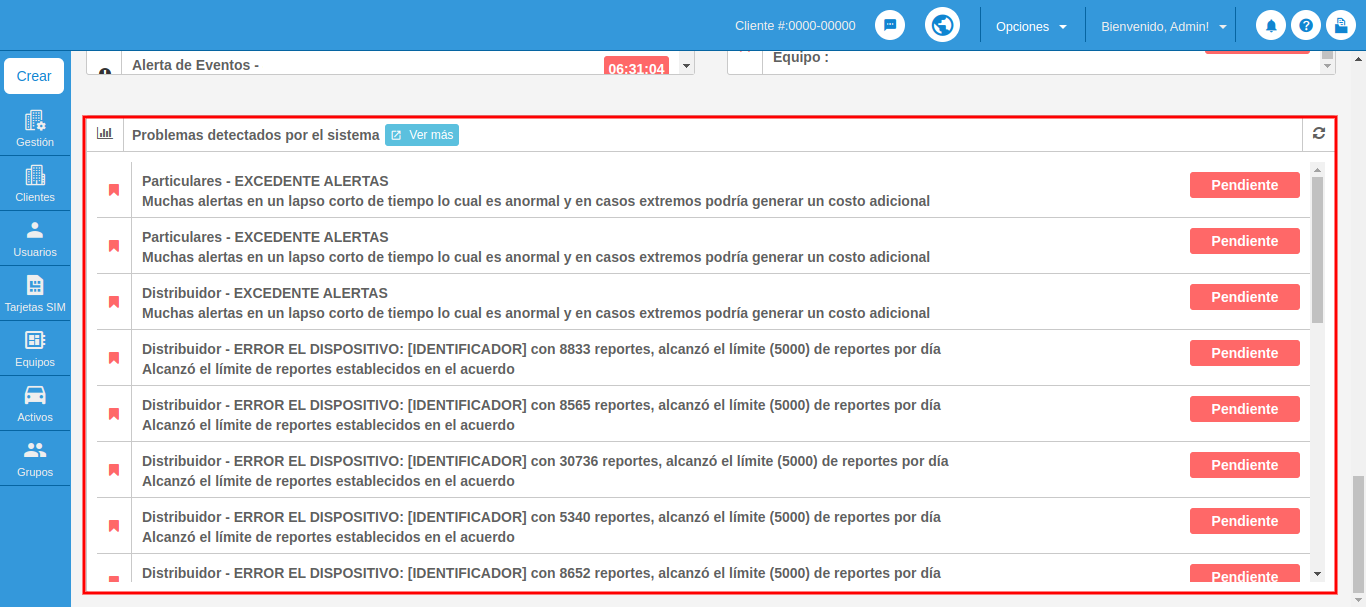
### <span style="font-size: 13.999999999999998pt; font-family: Arial; color: #4a86e8; background-color: transparent; font-weight: bold; font-style: normal; font-variant: normal; text-decoration: none; vertical-align: baseline; white-space: pre-wrap;">Problemas detectados por el sistema</span>

<span style="font-size: 12pt; font-family: Arial; color: #333333; background-color: transparent; font-weight: 400; font-style: normal; font-variant: normal; text-decoration: none; vertical-align: baseline; white-space: pre-wrap;">En esta sección podrás visualizar diferentes tipos de incidentes que el Asistente RedGPS ha detectado en tu cuenta:</span>

[![image-1711470550533.png](https://docs.redgps.com/uploads/images/gallery/2024-03/scaled-1680-/image-1711470550533.png)](https://docs.redgps.com/uploads/images/gallery/2024-03/image-1711470550533.png)

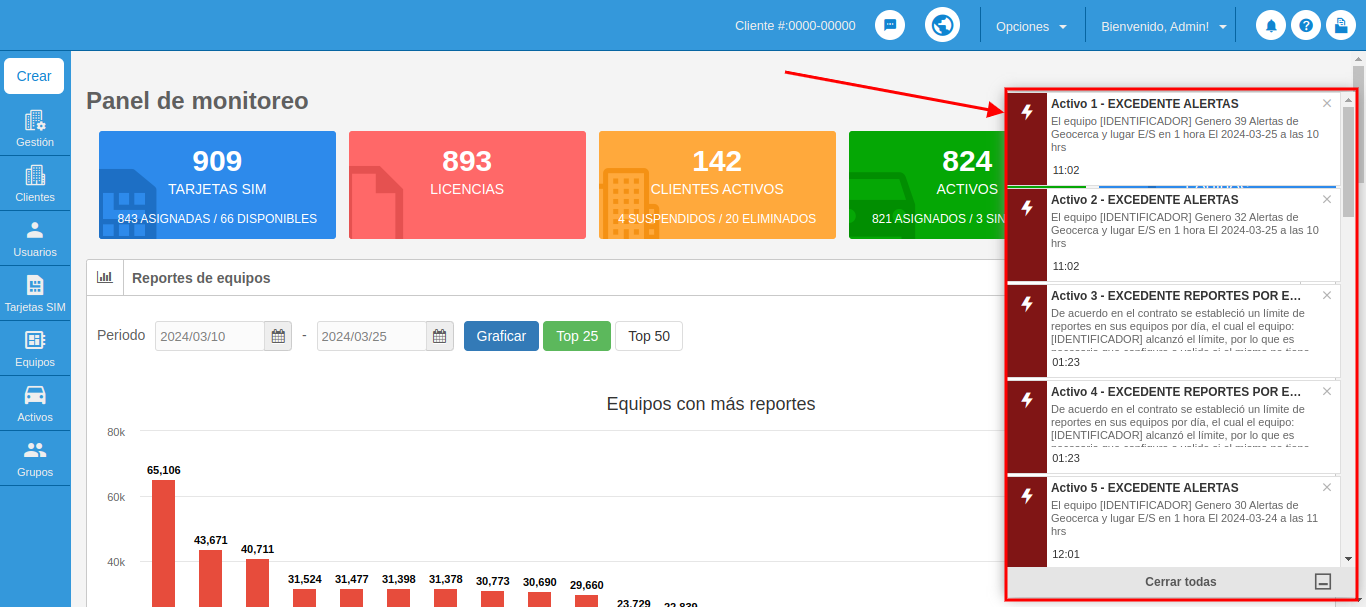
<span style="font-size: 12pt; font-family: Arial; color: #333333; background-color: transparent; font-weight: 400; font-style: normal; font-variant: normal; text-decoration: none; vertical-align: baseline; white-space: pre-wrap;">También recibirás notificaciones de estos incidentes en tu plataforma OnPartners y OnTracking:</span>

[![image-1711470652616.png](https://docs.redgps.com/uploads/images/gallery/2024-03/scaled-1680-/image-1711470652616.png)](https://docs.redgps.com/uploads/images/gallery/2024-03/image-1711470652616.png)

<span style="font-size: 12pt; font-family: Arial; color: #333333; background-color: transparent; font-weight: 400; font-style: normal; font-variant: normal; text-decoration: none; vertical-align: baseline; white-space: pre-wrap;"> Estas notificaciones tienen como objetivo mantener tu plataforma y la de tus clientes optimizada, orientándote a realizar un correcto uso de la plataforma. </span>

Al hacer clic en el incidente listado o en la notificación se muestra mayor información del incidente detectado:

[![image-1711466954378.png](https://docs.redgps.com/uploads/images/gallery/2024-03/scaled-1680-/image-1711466954378.png)](https://docs.redgps.com/uploads/images/gallery/2024-03/image-1711466954378.png)
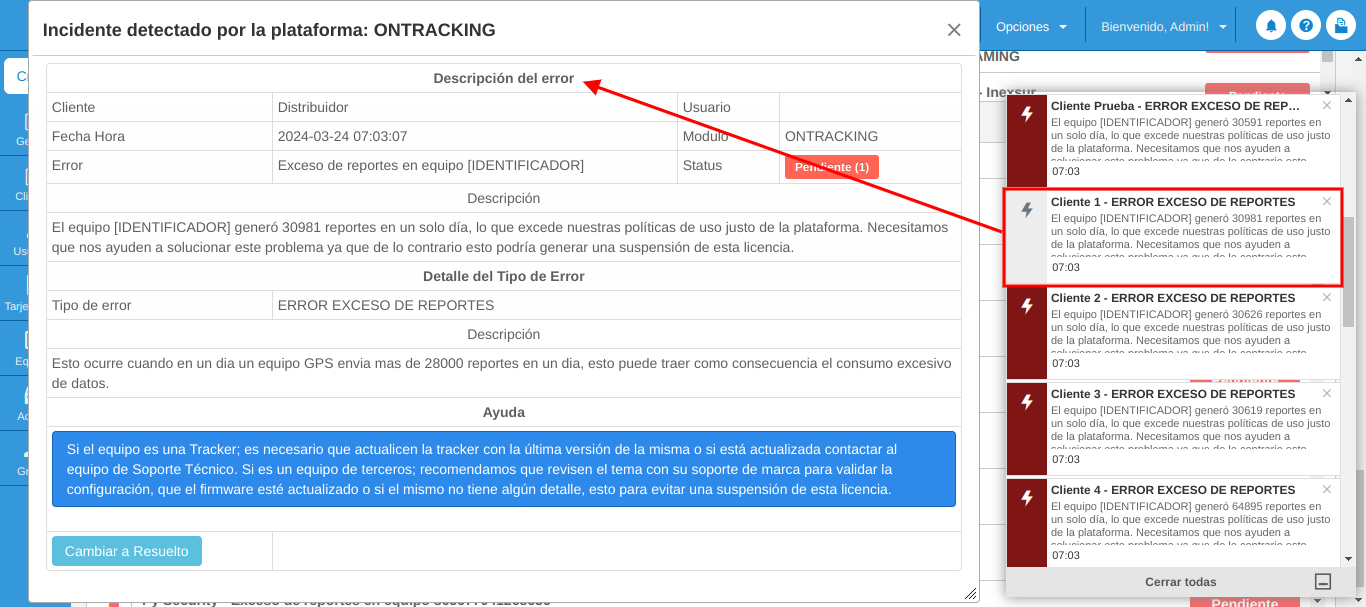
Es importante leer y tomar acción sobre los problemas detectados por el Asistente RedGPS para hacer un correcto uso de los recursos de la plataforma y así poder brindarte el mejor producto para ti y tus clientes.

Las notificaciones que podrás encontrar en esta sección son:

- EXCEDENTE ALERTAS: Cuando un Activo ha generado muchas alertas de un tipo en específico en un corto intervalo de tiempo.
- EXCEDENTE REPORTES POR EQUIPO: Cuando un equipo ha generado una cantidad mayor de reportes en un día.
- LUGARES DUPLICADOS: Cuando se detecta que un cliente cuenta con más de un lugar en las mismas coordenadas.
- ERROR EXCESO DE REPORTES: Cuando un equipo generó más de 28,000 reportes en un día.
- GPRS PENDIENTES: Cuando la plataforma detecta que tiene varios GPRS pendientes por enviar a un equipo.

En el detalle del incidente podrás encontrar en la parte inferior una sección de **Ayuda**, la cual te dará consejos de cómo resolver los inconvenientes encontrados en tu cuenta. Luego de tomar acción sobre el problema, podrás hacer clic en el botón **Cambiar a resuelto.**

**IMPORTANTE:** En caso de que el inconveniente persista, aunque se haya cambiado a resuelto, al siguiente día se volverá a generar la notificación y aparecerá listado nuevamente en la sección Problemas detectados por el sistema.