# Gestión de clientes

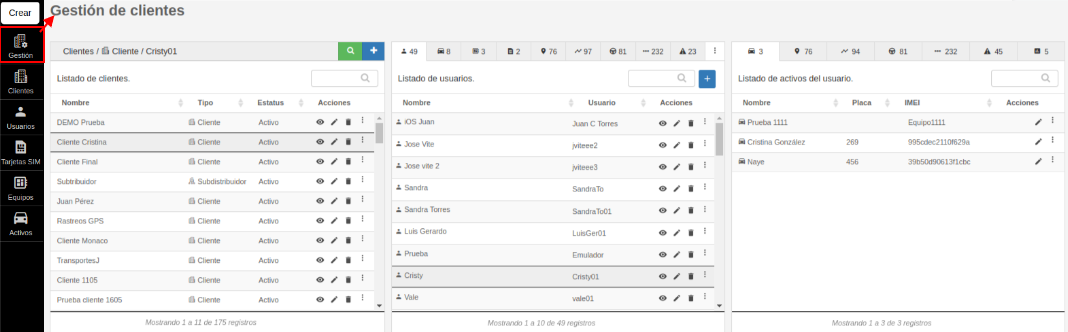
##### <span style="font-size: 12pt; font-family: Arial; color: #666666; background-color: transparent; font-weight: 400; font-style: normal; font-variant: normal; text-decoration: none; vertical-align: baseline; white-space: pre-wrap;">Este módulo permite administrar de una manera muy fácil e intuitiva toda la información de tus clientes. Cuenta con 3 apartados; clientes, elementos del cliente y permisos del usuario.</span>

[![image-1669761334253.png](https://docs.redgps.com/uploads/images/gallery/2022-11/scaled-1680-/image-1669761334253.png)](https://docs.redgps.com/uploads/images/gallery/2022-11/image-1669761334253.png)

#### <span style="font-size: 12pt; font-family: Arial; color: #666666; background-color: transparent; font-weight: bold; font-style: normal; font-variant: normal; text-decoration: none; vertical-align: baseline; white-space: pre-wrap;">Clientes</span>

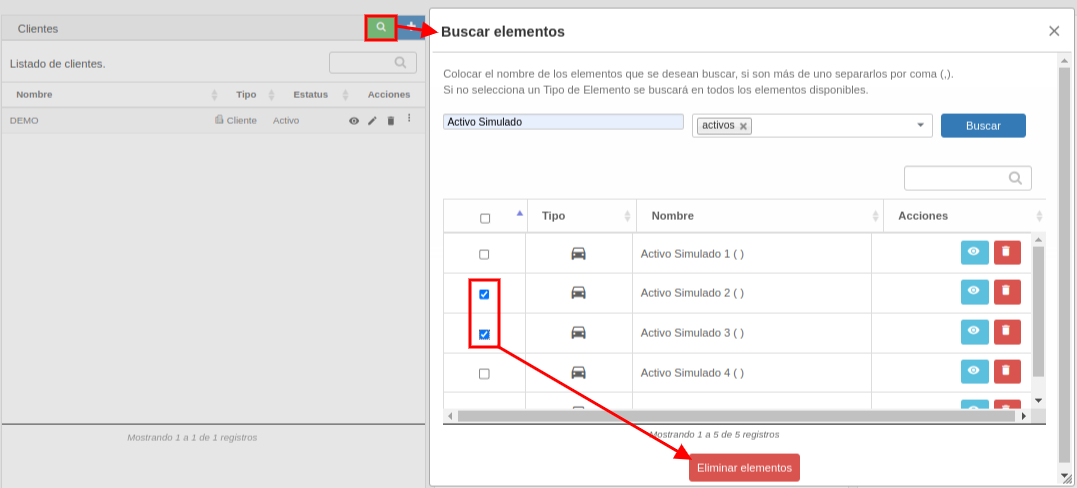
- <span style="font-size: 12pt; font-family: Arial; color: #666666; background-color: transparent; font-weight: bold; font-style: normal; font-variant: normal; text-decoration: none; vertical-align: baseline; white-space: pre-wrap;">Buscar elementos: <span style="font-size: 12pt; font-family: Arial; color: #666666; background-color: transparent; font-weight: 400; font-style: normal; font-variant: normal; text-decoration: none; vertical-align: baseline; white-space: pre-wrap;">Este botón permite realizar búsquedas de cualquier elemento de tus clientes, por ejemplo: alertas, geocercas, lugares, clientes, usuarios, Activos, equipos, sims, conductores y rutas. Además con el botón de "Visualizar" muestra dentro de qué cliente está el elemento y con el botón de "Eliminar" podemos dar de baja el elemento, o con los checks podemos hacer eliminaciones masivas.</span></span>

[![BUSCAR GESTIÓN.png](https://docs.redgps.com/uploads/images/gallery/2022-11/scaled-1680-/buscar-gestion.png)](https://docs.redgps.com/uploads/images/gallery/2022-11/buscar-gestion.png)

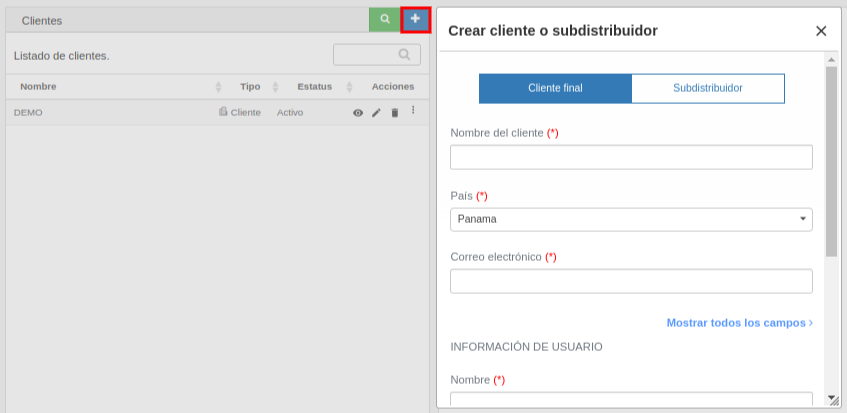
- <span style="font-size: 12pt; font-family: Arial; color: #666666; background-color: transparent; font-weight: 400; font-style: normal; font-variant: normal; text-decoration: none; vertical-align: baseline; white-space: pre-wrap;">**Crear cliente o subdistribuidor:** Este botón permite crear un nuevo registro de cliente o subdistribuidor, solo es necesario hacer clic en el botón de "+" y registrar los datos solicitados en el formulario del cliente y del primer usuario. </span><span style="font-size: 12pt; font-family: Arial; color: #666666; background-color: transparent; font-weight: 400; font-style: normal; font-variant: normal; text-decoration: none; vertical-align: baseline; white-space: pre-wrap;">Es muy importante que ingreses toda la información requerida y que selecciones el tipo de cliente necesitas crear.</span>

[![image-1669324530205.png](https://docs.redgps.com/uploads/images/gallery/2022-11/scaled-1680-/image-1669324530205.png)](https://docs.redgps.com/uploads/images/gallery/2022-11/image-1669324530205.png)

- - 
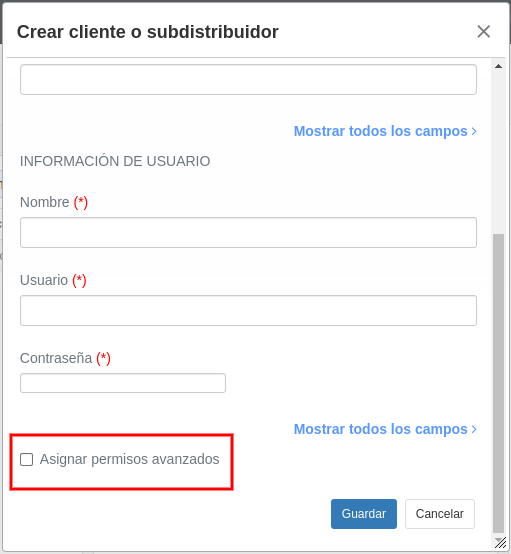
    - <span style="font-size: 12pt; font-family: Arial; color: #666666; background-color: transparent; font-weight: 400; font-style: normal; font-variant: normal; text-decoration: none; vertical-align: baseline; white-space: pre-wrap;">Un **cliente final** es una flota de Activos a quien tu empresa como distribuidor le brinda el servicio de localización satelital, por lo que tú eres el encargado de crear y gestionar sus usuarios, Activos, equipos y sims. </span><span style="font-size: 12pt; font-family: Arial; color: #666666; background-color: transparent; font-weight: 400; font-style: normal; font-variant: normal; text-decoration: none; vertical-align: baseline; white-space: pre-wrap;">En caso de que necesites que este cliente final tenga<span style="color: #3366ff;"> [permisos avanzados](https://docs.redgps.com/books/onpartners/page/permisos-avanzados)</span> para crear por usuarios o algo adicional de los permisos básicos, tienes que marcar el campo "Asignar permisos avanzados" que se encuentra al final del formulario:</span>
- [![image-1670942538152.png](https://docs.redgps.com/uploads/images/gallery/2022-12/scaled-1680-/image-1670942538152.png)](https://docs.redgps.com/uploads/images/gallery/2022-12/image-1670942538152.png)
    
    
    - <span style="font-size: 12pt; font-family: Arial; color: #666666; background-color: transparent; font-weight: 400; font-style: normal; font-variant: normal; text-decoration: none; vertical-align: baseline; white-space: pre-wrap;">Por otro lado, un **subdistribuidor** es una empresa que revende el servicio de rastreo GPS, por lo que este podrá crear clientes, usuarios, Activos, equipos y sims desde OnTracking en el <span style="color: #3366ff;">[módulo de Administración](https://docs.redgps.com/books/onpartners/page/subdistribuidores)</span></span><span style="font-size: 12pt; font-family: Arial; color: #666666; background-color: transparent; font-weight: 400; font-style: normal; font-variant: normal; text-decoration: none; vertical-align: baseline; white-space: pre-wrap;">. A este subdistribuidor se le asignarán <span style="color: #3366ff;">[permisos avanzados](https://docs.redgps.com/books/onpartners/page/permisos-avanzados) </span>automáticamente.</span>
- 

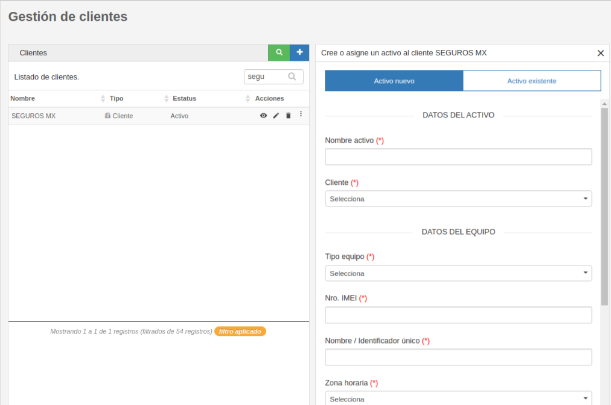
<span style="font-size: 12pt; font-family: Arial; color: #666666; background-color: transparent; font-weight: 400; font-style: normal; font-variant: normal; text-decoration: none; vertical-align: baseline; white-space: pre-wrap;">Posterior a dar de alta al cliente, la plataforma permite crear un nuevo Activos al cliente, en conjunto con su equipo y sim, en un solo formulario:</span>

[![image-1724436687943.png](https://docs.redgps.com/uploads/images/gallery/2024-08/scaled-1680-/image-1724436687943.png)](https://docs.redgps.com/uploads/images/gallery/2024-08/image-1724436687943.png)

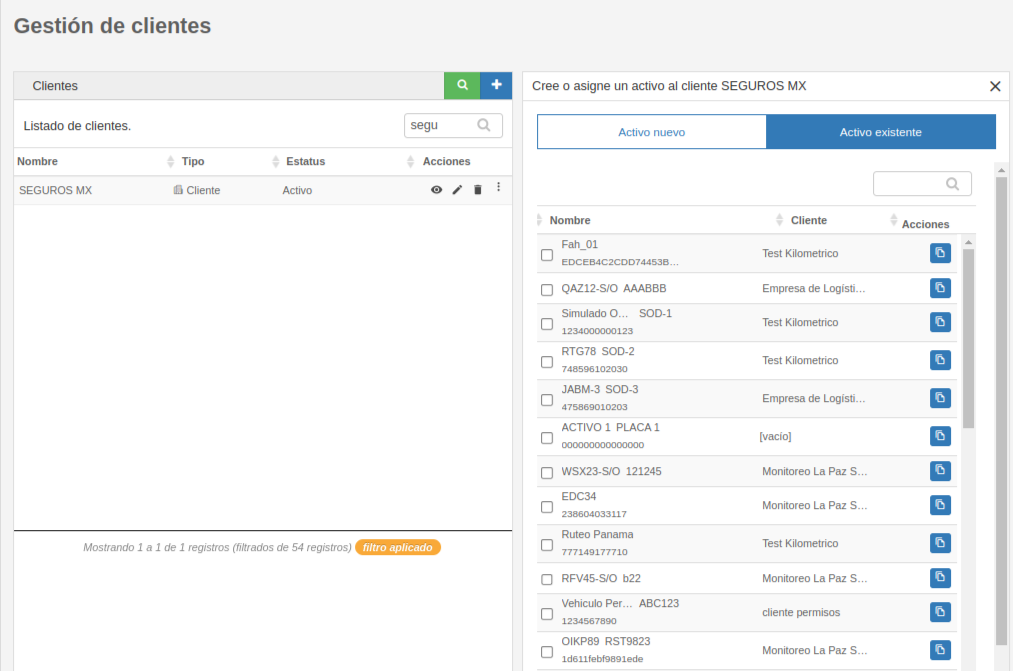
<span style="font-size: 12pt; font-family: Arial; color: #666666; background-color: transparent; font-weight: 400; font-style: normal; font-variant: normal; text-decoration: none; vertical-align: baseline; white-space: pre-wrap;">O también puedes dar permiso a ese cliente de los Activos existentes en tu cuenta, marcando la casilla:</span>

[![image-1669823642755.png](https://docs.redgps.com/uploads/images/gallery/2022-11/scaled-1680-/image-1669823642755.png)](https://docs.redgps.com/uploads/images/gallery/2022-11/image-1669823642755.png)

<span style="font-size: 12pt; font-family: Arial; color: #666666; background-color: transparent; font-weight: 400; font-style: normal; font-variant: normal; text-decoration: none; vertical-align: baseline; white-space: pre-wrap;">El botón "Duplicar este elemento" sirve para crear un Activo, equipo y sim con características similares a uno que ya está creado, la información que se copia en el formulario para su creación es únicamente la del equipo y son los campos: tipo equipo, zona horaria, país, marca y modelo.</span>

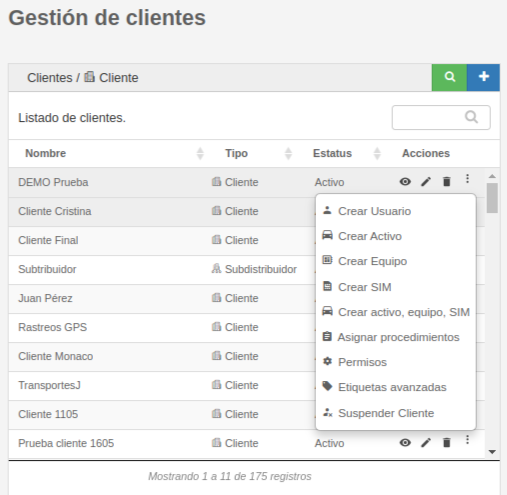
- <span style="font-size: 12pt; font-family: Arial; color: #666666; background-color: transparent; font-weight: 400; font-style: normal; font-variant: normal; text-decoration: none; vertical-align: baseline; white-space: pre-wrap;">**Listado de clientes:** En esta primer sección se listan todos tus clientes y podrás ejecutar estas acciones.</span>
    - <span style="font-size: 12pt; font-family: Arial; color: #666666; background-color: transparent; font-weight: 400; font-style: normal; font-variant: normal; text-decoration: none; vertical-align: baseline; white-space: pre-wrap;">Visualizar los **elementos por cliente**.</span>
    - <span style="font-size: 12pt; font-family: Arial; color: #666666; background-color: transparent; font-weight: 400; font-style: normal; font-variant: normal; text-decoration: none; vertical-align: baseline; white-space: pre-wrap;">**Editar** el registro del **cliente**.</span>
    - <span style="font-size: 12pt; font-family: Arial; color: #666666; background-color: transparent; font-weight: 400; font-style: normal; font-variant: normal; text-decoration: none; vertical-align: baseline; white-space: pre-wrap;">**Eliminar** el **cliente** y todos los elementos asociados a este, como por ejemplo usuarios, Activos, equipos, alertas, conductores, lugares, geocercas, mantenimientos, rutas, etc.</span>
    - **<span style="font-size: 12pt; font-family: Arial; color: #666666; background-color: transparent; font-style: normal; font-variant: normal; text-decoration: none; vertical-align: baseline; white-space: pre-wrap;">Crear</span>**<span style="font-size: 12pt; font-family: Arial; color: #666666; background-color: transparent; font-style: normal; font-variant: normal; text-decoration: none; vertical-align: baseline; white-space: pre-wrap;"> un **usuario** para el cliente.</span>
    - **<span style="font-size: 12pt; font-family: Arial; color: #666666; background-color: transparent; font-style: normal; font-variant: normal; text-decoration: none; vertical-align: baseline; white-space: pre-wrap;">Crear</span>**<span style="font-size: 12pt; font-family: Arial; color: #666666; background-color: transparent; font-style: normal; font-variant: normal; text-decoration: none; vertical-align: baseline; white-space: pre-wrap;"> un **Activo** del cliente.</span>
    - **<span style="font-size: 12pt; font-family: Arial; color: #666666; background-color: transparent; font-style: normal; font-variant: normal; text-decoration: none; vertical-align: baseline; white-space: pre-wrap;">Crear</span>**<span style="font-size: 12pt; font-family: Arial; color: #666666; background-color: transparent; font-style: normal; font-variant: normal; text-decoration: none; vertical-align: baseline; white-space: pre-wrap;"> un **equipo**.</span>
    - **<span style="font-size: 12pt; font-family: Arial; color: #666666; background-color: transparent; font-style: normal; font-variant: normal; text-decoration: none; vertical-align: baseline; white-space: pre-wrap;">Crear</span>**<span style="font-size: 12pt; font-family: Arial; color: #666666; background-color: transparent; font-style: normal; font-variant: normal; text-decoration: none; vertical-align: baseline; white-space: pre-wrap;"> una **sim**.</span>
    - <span style="font-size: 12pt; font-family: Arial; color: #666666; background-color: transparent; font-style: normal; font-variant: normal; text-decoration: none; vertical-align: baseline; white-space: pre-wrap;">O con un solo formulario podrás **crear** el **Activo** con su **equipo** y **sim**.</span>
    - <span style="font-size: 12pt; font-family: Arial; color: #666666; background-color: transparent; font-style: normal; font-variant: normal; text-decoration: none; vertical-align: baseline; white-space: pre-wrap;">**Asignar procedimientos**.</span>
    - <span style="font-size: 12pt; font-family: Arial; color: #666666; background-color: transparent; font-style: normal; font-variant: normal; text-decoration: none; vertical-align: baseline; white-space: pre-wrap;">Gestionar los **permisos** del cliente.</span>
    - <span style="font-size: 12pt; font-family: Arial; color: #666666; background-color: transparent; font-style: normal; font-variant: normal; text-decoration: none; vertical-align: baseline; white-space: pre-wrap;">Configurar las **etiquetas avanzadas** de los Activos del cliente.</span>
    - <span style="font-size: 12pt; font-family: Arial; color: #666666; background-color: transparent; font-style: normal; font-variant: normal; text-decoration: none; vertical-align: baseline; white-space: pre-wrap;">**Suspender** o reactivar al **cliente**.</span>

[![Listado de clientes.png](https://docs.redgps.com/uploads/images/gallery/2022-11/scaled-1680-/listado-de-clientes.png)](https://docs.redgps.com/uploads/images/gallery/2022-11/listado-de-clientes.png)


#### <span style="font-size: 12pt; font-family: Arial; color: #666666; background-color: transparent; font-weight: bold; font-style: normal; font-variant: normal; text-decoration: none; vertical-align: baseline; white-space: pre-wrap;">Elementos del cliente</span>

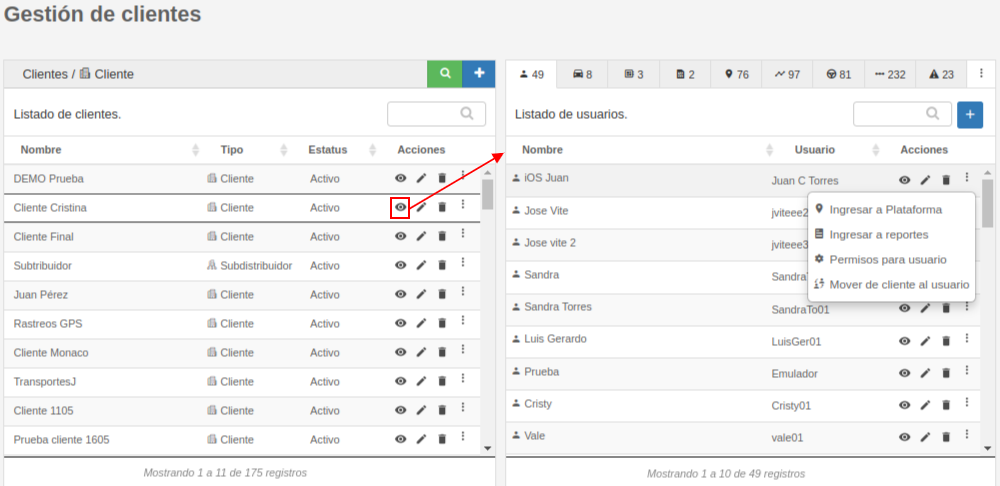
<span style="font-size: 12pt; font-family: Arial; color: #666666; background-color: transparent; font-weight: bold; font-style: normal; font-variant: normal; text-decoration: none; vertical-align: baseline; white-space: pre-wrap;"><span style="font-size: 12pt; font-family: Arial; color: #666666; background-color: transparent; font-weight: 400; font-style: normal; font-variant: normal; text-decoration: none; vertical-align: baseline; white-space: pre-wrap;">Se muestran algunos elementos del cliente y distintas acciones en cada uno de ellos.</span></span>

[![image-1669755008437.png](https://docs.redgps.com/uploads/images/gallery/2022-11/scaled-1680-/image-1669755008437.png)](https://docs.redgps.com/uploads/images/gallery/2022-11/image-1669755008437.png)

- <span style="font-size: 12pt; font-family: Arial; color: #666666; background-color: transparent; font-weight: bold; font-style: normal; font-variant: normal; text-decoration: none; vertical-align: baseline; white-space: pre-wrap;">Usuarios. <span style="font-size: 12pt; font-family: Arial; color: #666666; background-color: transparent; font-weight: 400; font-style: normal; font-variant: normal; text-decoration: none; vertical-align: baseline; white-space: pre-wrap;">Se listan todos los nombres y usuarios del cliente, podrás:</span></span>
    - <span style="font-size: 12pt; font-family: Arial; color: #666666; background-color: transparent; font-style: normal; font-variant: normal; text-decoration: none; vertical-align: baseline; white-space: pre-wrap;"><span style="font-size: 12pt; font-family: Arial; color: #666666; background-color: transparent; font-weight: 400; font-style: normal; font-variant: normal; text-decoration: none; vertical-align: baseline; white-space: pre-wrap;">Crear **nuevo usuario**.</span></span>
    - <span style="font-size: 12pt; font-family: Arial; color: #666666; background-color: transparent; font-style: normal; font-variant: normal; text-decoration: none; vertical-align: baseline; white-space: pre-wrap;"><span style="font-size: 12pt; font-family: Arial; color: #666666; background-color: transparent; font-weight: 400; font-style: normal; font-variant: normal; text-decoration: none; vertical-align: baseline; white-space: pre-wrap;">**Ver elementos del usuario**.</span></span>
    - <span style="font-size: 12pt; font-family: Arial; color: #666666; background-color: transparent; font-style: normal; font-variant: normal; text-decoration: none; vertical-align: baseline; white-space: pre-wrap;"><span style="font-size: 12pt; font-family: Arial; color: #666666; background-color: transparent; font-weight: 400; font-style: normal; font-variant: normal; text-decoration: none; vertical-align: baseline; white-space: pre-wrap;">**Editar usuario**.</span></span>
    - **<span style="font-size: 12pt; font-family: Arial; color: #666666; background-color: transparent; font-style: normal; font-variant: normal; text-decoration: none; vertical-align: baseline; white-space: pre-wrap;"><span style="font-size: 12pt; font-family: Arial; color: #666666; background-color: transparent; font-style: normal; font-variant: normal; text-decoration: none; vertical-align: baseline; white-space: pre-wrap;">Eliminar</span></span>**<span style="font-size: 12pt; font-family: Arial; color: #666666; background-color: transparent; font-style: normal; font-variant: normal; text-decoration: none; vertical-align: baseline; white-space: pre-wrap;"><span style="font-size: 12pt; font-family: Arial; color: #666666; background-color: transparent; font-style: normal; font-variant: normal; text-decoration: none; vertical-align: baseline; white-space: pre-wrap;"> **usuario**.</span></span>
    - **<span style="font-size: 12pt; font-family: Arial; color: #666666; background-color: transparent; font-style: normal; font-variant: normal; text-decoration: none; vertical-align: baseline; white-space: pre-wrap;"><span style="font-size: 12pt; font-family: Arial; color: #666666; background-color: transparent; font-style: normal; font-variant: normal; text-decoration: none; vertical-align: baseline; white-space: pre-wrap;">Ingresar a </span></span>**<span style="font-size: 12pt; font-family: Arial; color: #666666; background-color: transparent; font-style: normal; font-variant: normal; text-decoration: none; vertical-align: baseline; white-space: pre-wrap;"><span style="font-size: 12pt; font-family: Arial; color: #666666; background-color: transparent; font-style: normal; font-variant: normal; text-decoration: none; vertical-align: baseline; white-space: pre-wrap;">la</span></span><span style="font-size: 12pt; font-family: Arial; color: #666666; background-color: transparent; font-style: normal; font-variant: normal; text-decoration: none; vertical-align: baseline; white-space: pre-wrap;"><span style="font-size: 12pt; font-family: Arial; color: #666666; background-color: transparent; font-style: normal; font-variant: normal; text-decoration: none; vertical-align: baseline; white-space: pre-wrap;"> **plataforma** OnTracking como si fueramos ese usuario.</span></span>
    - **<span style="font-size: 12pt; font-family: Arial; color: #666666; background-color: transparent; font-style: normal; font-variant: normal; text-decoration: none; vertical-align: baseline; white-space: pre-wrap;"><span style="font-size: 12pt; font-family: Arial; color: #666666; background-color: transparent; font-style: normal; font-variant: normal; text-decoration: none; vertical-align: baseline; white-space: pre-wrap;">Ingresar a </span></span>**<span style="font-size: 12pt; font-family: Arial; color: #666666; background-color: transparent; font-style: normal; font-variant: normal; text-decoration: none; vertical-align: baseline; white-space: pre-wrap;"><span style="font-size: 12pt; font-family: Arial; color: #666666; background-color: transparent; font-style: normal; font-variant: normal; text-decoration: none; vertical-align: baseline; white-space: pre-wrap;">la</span></span><span style="font-size: 12pt; font-family: Arial; color: #666666; background-color: transparent; font-style: normal; font-variant: normal; text-decoration: none; vertical-align: baseline; white-space: pre-wrap;"><span style="font-size: 12pt; font-family: Arial; color: #666666; background-color: transparent; font-style: normal; font-variant: normal; text-decoration: none; vertical-align: baseline; white-space: pre-wrap;"> plataforma **OnReports** como si fueramos ese usuario.</span></span>
    - <span style="font-size: 12pt; font-family: Arial; color: #666666; background-color: transparent; font-style: normal; font-variant: normal; text-decoration: none; vertical-align: baseline; white-space: pre-wrap;"><span style="font-size: 12pt; font-family: Arial; color: #666666; background-color: transparent; font-style: normal; font-variant: normal; text-decoration: none; vertical-align: baseline; white-space: pre-wrap;">Gestionar los **permisos para** el **usuario**.</span></span>
    - <span style="font-size: 12pt; font-family: Arial; color: #666666; background-color: transparent; font-style: normal; font-variant: normal; text-decoration: none; vertical-align: baseline; white-space: pre-wrap;"><span style="font-size: 12pt; font-family: Arial; color: #666666; background-color: transparent; font-style: normal; font-variant: normal; text-decoration: none; vertical-align: baseline; white-space: pre-wrap;">**Mover de cliente al usuario**.</span></span>

- **<span style="font-size: 12pt; font-family: Arial; color: #666666; background-color: transparent; font-style: normal; font-variant: normal; text-decoration: none; vertical-align: baseline; white-space: pre-wrap;"><span style="font-size: 12pt; font-family: Arial; color: #666666; background-color: transparent; font-style: normal; font-variant: normal; text-decoration: none; vertical-align: baseline; white-space: pre-wrap;">Activos. </span></span>**<span style="font-size: 12pt; font-family: Arial; color: #666666; background-color: transparent; font-style: normal; font-variant: normal; text-decoration: none; vertical-align: baseline; white-space: pre-wrap;"><span style="font-size: 12pt; font-family: Arial; color: #666666; background-color: transparent; font-style: normal; font-variant: normal; text-decoration: none; vertical-align: baseline; white-space: pre-wrap;">Se muestran los Activos a los que tiene acceso el cliente, en conjunto de la placa e IMEI, podrás:</span></span>
    - **<span style="font-size: 12pt; font-family: Arial; color: #666666; background-color: transparent; font-style: normal; font-variant: normal; text-decoration: none; vertical-align: baseline; white-space: pre-wrap;"><span style="font-size: 12pt; font-family: Arial; color: #666666; background-color: transparent; font-style: normal; font-variant: normal; text-decoration: none; vertical-align: baseline; white-space: pre-wrap;">Editar</span></span>**<span style="font-size: 12pt; font-family: Arial; color: #666666; background-color: transparent; font-style: normal; font-variant: normal; text-decoration: none; vertical-align: baseline; white-space: pre-wrap;"><span style="font-size: 12pt; font-family: Arial; color: #666666; background-color: transparent; font-style: normal; font-variant: normal; text-decoration: none; vertical-align: baseline; white-space: pre-wrap;"> el Activo.</span></span>
    - **<span style="font-size: 12pt; font-family: Arial; color: #666666; background-color: transparent; font-style: normal; font-variant: normal; text-decoration: none; vertical-align: baseline; white-space: pre-wrap;"><span style="font-size: 12pt; font-family: Arial; color: #666666; background-color: transparent; font-style: normal; font-variant: normal; text-decoration: none; vertical-align: baseline; white-space: pre-wrap;">Quitar</span></span>**<span style="font-size: 12pt; font-family: Arial; color: #666666; background-color: transparent; font-style: normal; font-variant: normal; text-decoration: none; vertical-align: baseline; white-space: pre-wrap;"><span style="font-size: 12pt; font-family: Arial; color: #666666; background-color: transparent; font-style: normal; font-variant: normal; text-decoration: none; vertical-align: baseline; white-space: pre-wrap;"> el **permiso** al cliente del Activo.</span></span>
    - <span style="font-size: 12pt; font-family: Arial; color: #666666; background-color: transparent; font-style: normal; font-variant: normal; text-decoration: none; vertical-align: baseline; white-space: pre-wrap;"><span style="font-size: 12pt; font-family: Arial; color: #666666; background-color: transparent; font-style: normal; font-variant: normal; text-decoration: none; vertical-align: baseline; white-space: pre-wrap;">Con un solo botón **eliminar** el **Activo, equipo y sim**.</span></span>
    - **<span style="font-size: 12pt; font-family: Arial; color: #666666; background-color: transparent; font-style: normal; font-variant: normal; text-decoration: none; vertical-align: baseline; white-space: pre-wrap;"><span style="font-size: 12pt; font-family: Arial; color: #666666; background-color: transparent; font-style: normal; font-variant: normal; text-decoration: none; vertical-align: baseline; white-space: pre-wrap;">Reemplazar</span></span>**<span style="font-size: 12pt; font-family: Arial; color: #666666; background-color: transparent; font-style: normal; font-variant: normal; text-decoration: none; vertical-align: baseline; white-space: pre-wrap;"><span style="font-size: 12pt; font-family: Arial; color: #666666; background-color: transparent; font-style: normal; font-variant: normal; text-decoration: none; vertical-align: baseline; white-space: pre-wrap;"> el **equipo** que está asignado al Activo.</span></span>
    - **<span style="font-size: 12pt; font-family: Arial; color: #666666; background-color: transparent; font-style: normal; font-variant: normal; text-decoration: none; vertical-align: baseline; white-space: pre-wrap;"><span style="font-size: 12pt; font-family: Arial; color: #666666; background-color: transparent; font-style: normal; font-variant: normal; text-decoration: none; vertical-align: baseline; white-space: pre-wrap;">Asignar</span></span><span style="font-size: 12pt; font-family: Arial; color: #666666; background-color: transparent; font-style: normal; font-variant: normal; text-decoration: none; vertical-align: baseline; white-space: pre-wrap;"><span style="font-size: 12pt; font-family: Arial; color: #666666; background-color: transparent; font-style: normal; font-variant: normal; text-decoration: none; vertical-align: baseline; white-space: pre-wrap;"> procedimientos</span></span>**<span style="font-size: 12pt; font-family: Arial; color: #666666; background-color: transparent; font-style: normal; font-variant: normal; text-decoration: none; vertical-align: baseline; white-space: pre-wrap;"><span style="font-size: 12pt; font-family: Arial; color: #666666; background-color: transparent; font-style: normal; font-variant: normal; text-decoration: none; vertical-align: baseline; white-space: pre-wrap;">.</span></span>
    - **<span style="font-size: 12pt; font-family: Arial; color: #666666; background-color: transparent; font-style: normal; font-variant: normal; text-decoration: none; vertical-align: baseline; white-space: pre-wrap;"><span style="font-size: 12pt; font-family: Arial; color: #666666; background-color: transparent; font-style: normal; font-variant: normal; text-decoration: none; vertical-align: baseline; white-space: pre-wrap;">Asignar</span></span>**<span style="font-size: 12pt; font-family: Arial; color: #666666; background-color: transparent; font-style: normal; font-variant: normal; text-decoration: none; vertical-align: baseline; white-space: pre-wrap;"><span style="font-size: 12pt; font-family: Arial; color: #666666; background-color: transparent; font-style: normal; font-variant: normal; text-decoration: none; vertical-align: baseline; white-space: pre-wrap;"> **sensores**.</span></span>
    - <span style="font-size: 12pt; font-family: Arial; color: #666666; background-color: transparent; font-style: normal; font-variant: normal; text-decoration: none; vertical-align: baseline; white-space: pre-wrap;"><span style="font-size: 12pt; font-family: Arial; color: #666666; background-color: transparent; font-style: normal; font-variant: normal; text-decoration: none; vertical-align: baseline; white-space: pre-wrap;">Visualizar las **últimas muestras**.</span></span>
    - **<span style="font-size: 12pt; font-family: Arial; color: #666666; background-color: transparent; font-style: normal; font-variant: normal; text-decoration: none; vertical-align: baseline; white-space: pre-wrap;"><span style="font-size: 12pt; font-family: Arial; color: #666666; background-color: transparent; font-style: normal; font-variant: normal; text-decoration: none; vertical-align: baseline; white-space: pre-wrap;">Ajustar</span></span>**<span style="font-size: 12pt; font-family: Arial; color: #666666; background-color: transparent; font-style: normal; font-variant: normal; text-decoration: none; vertical-align: baseline; white-space: pre-wrap;"><span style="font-size: 12pt; font-family: Arial; color: #666666; background-color: transparent; font-style: normal; font-variant: normal; text-decoration: none; vertical-align: baseline; white-space: pre-wrap;"> el **odómetro**.</span></span>
    - <span style="font-size: 12pt; font-family: Arial; color: #666666; background-color: transparent; font-style: normal; font-variant: normal; text-decoration: none; vertical-align: baseline; white-space: pre-wrap;"><span style="font-size: 12pt; font-family: Arial; color: #666666; background-color: transparent; font-style: normal; font-variant: normal; text-decoration: none; vertical-align: baseline; white-space: pre-wrap;">Configurar la **tabla de combustible**.</span></span>
    - **<span style="font-size: 12pt; font-family: Arial; color: #666666; background-color: transparent; font-style: normal; font-variant: normal; text-decoration: none; vertical-align: baseline; white-space: pre-wrap;"><span style="font-size: 12pt; font-family: Arial; color: #666666; background-color: transparent; font-style: normal; font-variant: normal; text-decoration: none; vertical-align: baseline; white-space: pre-wrap;">Cambiar</span></span>**<span style="font-size: 12pt; font-family: Arial; color: #666666; background-color: transparent; font-style: normal; font-variant: normal; text-decoration: none; vertical-align: baseline; white-space: pre-wrap;"><span style="font-size: 12pt; font-family: Arial; color: #666666; background-color: transparent; font-style: normal; font-variant: normal; text-decoration: none; vertical-align: baseline; white-space: pre-wrap;"> al **Activo** de **cliente**.</span></span>
    - <span style="font-size: 12pt; font-family: Arial; color: #666666; background-color: transparent; font-style: normal; font-variant: normal; text-decoration: none; vertical-align: baseline; white-space: pre-wrap;"><span style="font-size: 12pt; font-family: Arial; color: #666666; background-color: transparent; font-style: normal; font-variant: normal; text-decoration: none; vertical-align: baseline; white-space: pre-wrap;">**Editar** el **equipo del Activo.**</span></span>
    - <span style="font-size: 12pt; font-family: Arial; color: #666666; background-color: transparent; font-style: normal; font-variant: normal; text-decoration: none; vertical-align: baseline; white-space: pre-wrap;"><span style="font-size: 12pt; font-family: Arial; color: #666666; background-color: transparent; font-style: normal; font-variant: normal; text-decoration: none; vertical-align: baseline; white-space: pre-wrap;">**Editar** la **sim del Activo.**</span></span>

- **<span style="font-size: 12pt; font-family: Arial; color: #666666; background-color: transparent; font-style: normal; font-variant: normal; text-decoration: none; vertical-align: baseline; white-space: pre-wrap;">Equipo. </span>**<span style="font-size: 12pt; font-family: Arial; color: #666666; background-color: transparent; font-style: normal; font-variant: normal; text-decoration: none; vertical-align: baseline; white-space: pre-wrap;">Se muestran los nombres de los equipos, en conjunto la marca y modelo, podrás **editar** y **eliminar**.</span>
- **<span style="font-size: 12pt; font-family: Arial; color: #666666; background-color: transparent; font-style: normal; font-variant: normal; text-decoration: none; vertical-align: baseline; white-space: pre-wrap;">Sims.</span>**<span style="font-size: 12pt; font-family: Arial; color: #666666; background-color: transparent; font-style: normal; font-variant: normal; text-decoration: none; vertical-align: baseline; white-space: pre-wrap;"> Se listan los nombres y números telefónicos de las sims, podrás **editar** y **eliminar**.</span>
- <span style="font-size: 12pt; font-family: Arial; color: #666666; background-color: transparent; font-style: normal; font-variant: normal; text-decoration: none; vertical-align: baseline; white-space: pre-wrap;">También se muestran los **lugares**, **geocercas** y **conductores** con la opción de **editar** y **eliminar**.</span>
- **<span style="font-size: 12pt; font-family: Arial; color: #666666; background-color: transparent; font-style: normal; font-variant: normal; text-decoration: none; vertical-align: baseline; white-space: pre-wrap;">Rutas.</span>**<span style="font-size: 12pt; font-family: Arial; color: #666666; background-color: transparent; font-style: normal; font-variant: normal; text-decoration: none; vertical-align: baseline; white-space: pre-wrap;"> Se listan los nombres de las rutas y la plataforma a la que pertenece la ruta, podrás **editar** y **eliminar**.</span>
- <span style="font-size: 12pt; font-family: Arial; color: #666666; background-color: transparent; font-style: normal; font-variant: normal; text-decoration: none; vertical-align: baseline; white-space: pre-wrap;">Por último se listan las **alertas** con sus</span><span style="font-size: 12pt; font-family: Arial; color: #666666; background-color: transparent; font-style: normal; font-variant: normal; text-decoration: none; vertical-align: baseline; white-space: pre-wrap;"> nombres y el tipo de alerta, podrás **editar** y **eliminar**.</span>

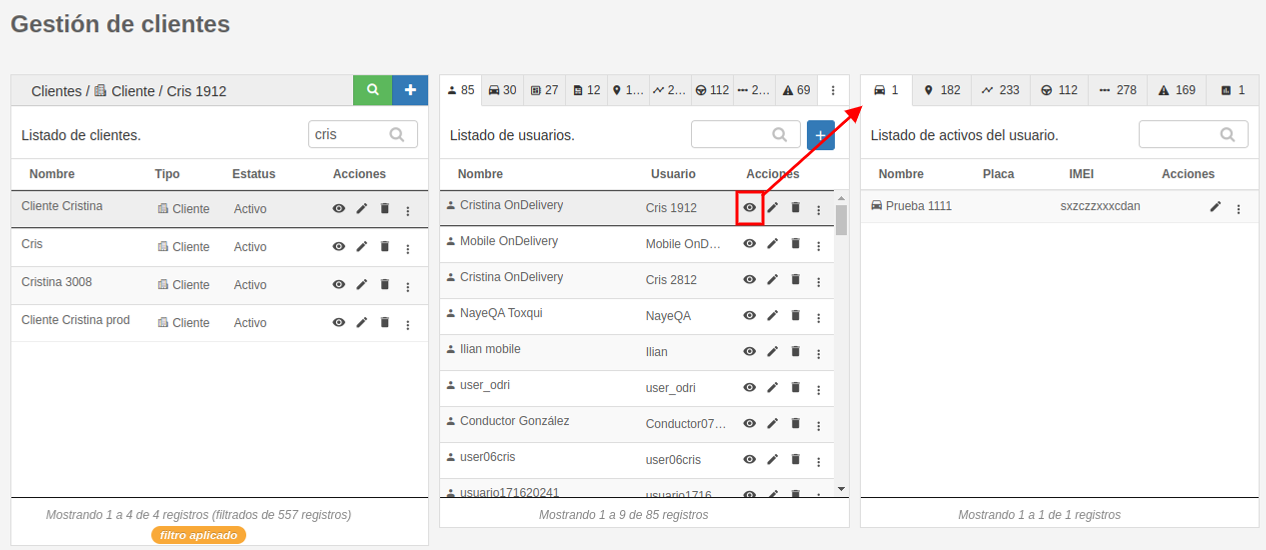
#### <span style="font-size: 12pt; font-family: Arial; color: #666666; background-color: transparent; font-weight: bold; font-style: normal; font-variant: normal; text-decoration: none; vertical-align: baseline; white-space: pre-wrap;">Elementos del usuario</span>

<span style="font-size: 12pt; font-family: Arial; color: #666666; background-color: transparent; font-weight: bold; font-style: normal; font-variant: normal; text-decoration: none; vertical-align: baseline; white-space: pre-wrap;"><span style="font-size: 12pt; font-family: Arial; color: #666666; background-color: transparent; font-weight: 400; font-style: normal; font-variant: normal; text-decoration: none; vertical-align: baseline; white-space: pre-wrap;">Al hacer clic en "Ver elementos del usuario" en la segunda sección, se muestran algunos elementos del usuario, como los Activos a los que tiene permiso, lugares, geocercas, conductores, rutas, alertas y los módulos que están asignados al usuario, con la posibilidad de agregar o quitar permisos de las plataformas y módulos en el usuario.</span></span>

[![image-1724436933575.png](https://docs.redgps.com/uploads/images/gallery/2024-08/scaled-1680-/image-1724436933575.png)](https://docs.redgps.com/uploads/images/gallery/2024-08/image-1724436933575.png)