# Equipamentos

<span style="font-size: 12pt; font-family: Arial; color: #333333; background-color: transparent; font-weight: 400; font-style: normal; font-variant: normal; text-decoration: none; vertical-align: baseline; white-space: pre-wrap;">Este módulo ajuda você a gerenciar o registro de novos dispositivos GPS, bem como sua exclusão e modificação.</span>

<span style="font-size: 12pt; font-family: Arial; color: #333333; background-color: transparent; font-weight: 400; font-style: normal; font-variant: normal; text-decoration: none; vertical-align: baseline; white-space: pre-wrap;">Para criar dispositivos GPS, primeiro você deve criar o cartão SIM e seguir os seguintes passos:</span>

1. 1. 1. <span style="font-size: 12pt; font-family: Arial; color: #333333; background-color: transparent; font-weight: 400; font-style: normal; font-variant: normal; text-decoration: none; vertical-align: baseline; white-space: pre-wrap;">Para cadastrar o equipamento GPS deve-se pressionar o botão “+”;</span>
        2. <span style="font-size: 12pt; font-family: Arial; color: #333333; background-color: transparent; font-weight: 400; font-style: normal; font-variant: normal; text-decoration: none; vertical-align: baseline; white-space: pre-wrap;">No formulário que aparece deverá preencher os campos solicitados, alguns deles estão descritos a seguir.</span>

<span style="font-size: 12pt; font-family: Arial; color: #333333; background-color: transparent; font-weight: bold; font-style: normal; font-variant: normal; text-decoration: none; vertical-align: baseline; white-space: pre-wrap;">a) ID\_EQUIPAMENTO,</span><span style="font-size: 12pt; font-family: Arial; color: #333333; background-color: transparent; font-weight: 400; font-style: normal; font-variant: normal; text-decoration: none; vertical-align: baseline; white-space: pre-wrap;"> Insira o identificador de licença único com o qual você identificará e programará seu equipamento. Se o seu dispositivo comunicar por IMEI, é recomendável inseri-lo (para verificar consulte o manual do equipamento).</span>

<span style="font-size: 12pt; font-family: Arial; color: #333333; background-color: transparent; font-weight: bold; font-style: normal; font-variant: normal; text-decoration: none; vertical-align: baseline; white-space: pre-wrap;">b) Cartão SIM,</span><span style="font-size: 12pt; font-family: Arial; color: #333333; background-color: transparent; font-weight: 400; font-style: normal; font-variant: normal; text-decoration: none; vertical-align: baseline; white-space: pre-wrap;"> .Neste campo você deve selecionar o cartão SIM que foi previamente cadastrado e, portanto, relacionado a este dispositivo. Lembre-se que o sistema só permitirá </span>

<span style="font-size: 12pt; font-family: Arial; color: #333333; background-color: transparent; font-weight: 400; font-style: normal; font-variant: normal; text-decoration: none; vertical-align: baseline; white-space: pre-wrap;">associar um cartão a um único dispositivo.</span>

<span style="font-size: 12pt; font-family: Arial; color: #333333; background-color: transparent; font-weight: bold; font-style: normal; font-variant: normal; text-decoration: none; vertical-align: baseline; white-space: pre-wrap;">c) Nro. IMEI,</span><span style="font-size: 12pt; font-family: Arial; color: #333333; background-color: transparent; font-weight: 400; font-style: normal; font-variant: normal; text-decoration: none; vertical-align: baseline; white-space: pre-wrap;"> digite o número IMEI do seu aparelho, ele é composto por quinze dígitos, caso o seu aparelho não tenha quinze dígitos você terá que completá-lo com zeros à esquerda. O IMEI (International Mobile Station Equipment Identity) é um código USSD pré-gravado nos aparelhos. Este código identifica o dispositivo de forma exclusiva em todo o mundo e é transmitido pelo dispositivo à rede quando conectado a ele.</span>

<span style="font-size: 12pt; font-family: Arial; color: #333333; background-color: transparent; font-weight: bold; font-style: normal; font-variant: normal; text-decoration: none; vertical-align: baseline; white-space: pre-wrap;">d) Números pânico,</span><span style="font-size: 12pt; font-family: Arial; color: #333333; background-color: transparent; font-weight: 400; font-style: normal; font-variant: normal; text-decoration: none; vertical-align: baseline; white-space: pre-wrap;"> Cadastre o(s) número(s) de celular para onde serão enviadas as mensagens de texto dos alertas de pânico gerados por este equipamento, esse alerta será notificado caso você possua o aplicativo SMS Gateway \[Ver ajuda do SMS gateway\](toLink-40-SMS\_Gateway , o os números inseridos devem sempre ser separados por vírgula e sem espaço.</span>

<span style="font-size: 12pt; font-family: Arial; color: #333333; background-color: transparent; font-weight: bold; font-style: normal; font-variant: normal; text-decoration: none; vertical-align: baseline; white-space: pre-wrap;">e) E-mails pânicos,</span><span style="font-size: 12pt; font-family: Arial; color: #333333; background-color: transparent; font-weight: 400; font-style: normal; font-variant: normal; text-decoration: none; vertical-align: baseline; white-space: pre-wrap;"> insira o(s) e-mail(s) da(s) pessoa(s) autorizada(s) a receber notificações de alertas de pânico gerados por este equipamento. Você pode inserir um ou mais e-mails, desde que separados por vírgula e sem espaço.</span>

<span style="font-size: 12pt; font-family: Arial; color: #333333; background-color: transparent; font-weight: bold; font-style: normal; font-variant: normal; text-decoration: none; vertical-align: baseline; white-space: pre-wrap;">f) Mensagem pânico,</span><span style="font-size: 12pt; font-family: Arial; color: #333333; background-color: transparent; font-weight: 400; font-style: normal; font-variant: normal; text-decoration: none; vertical-align: baseline; white-space: pre-wrap;"> neste campo, se necessário, adicione o texto com a mensagem que deseja receber para os alertas de pânico gerados por este equipamento.</span>

<span style="font-size: 12pt; font-family: Arial; color: #333333; background-color: transparent; font-weight: bold; font-style: normal; font-variant: normal; text-decoration: none; vertical-align: baseline; white-space: pre-wrap;">g) Imagens,</span><span style="font-size: 12pt; font-family: Arial; color: #333333; background-color: transparent; font-weight: 400; font-style: normal; font-variant: normal; text-decoration: none; vertical-align: baseline; white-space: pre-wrap;"> esta opção só está disponível se o seu equipamento possuir envio de imagens e possuir uma câmera conectada, recomenda-se consultar o suporte técnico para aprovação..</span>

<span style="font-size: 12pt; font-family: Arial; color: #333333; background-color: transparent; font-weight: bold; font-style: normal; font-variant: normal; text-decoration: none; vertical-align: baseline; white-space: pre-wrap;">h) Consumo combustível,</span><span style="font-size: 12pt; font-family: Arial; color: #333333; background-color: transparent; font-weight: 400; font-style: normal; font-variant: normal; text-decoration: none; vertical-align: baseline; white-space: pre-wrap;"> esta opção está disponível caso seu equipamento possua medidor de vazão de combustível ou informe o nível de combustível via Can BUS.</span>

<span style="font-size: 12pt; font-family: Arial; color: #333333; background-color: transparent; font-weight: bold; font-style: normal; font-variant: normal; text-decoration: none; vertical-align: baseline; white-space: pre-wrap;">i) Zona horaria,</span><span style="font-size: 12pt; font-family: Arial; color: #333333; background-color: transparent; font-weight: 400; font-style: normal; font-variant: normal; text-decoration: none; vertical-align: baseline; white-space: pre-wrap;"> selecione o fuso horário do seu país, é importante que seu equipamento reporte no horário correspondente.</span>

<span style="font-size: 12pt; font-family: Arial; color: #333333; background-color: transparent; font-weight: bold; font-style: normal; font-variant: normal; text-decoration: none; vertical-align: baseline; white-space: pre-wrap;">j) Latitude e longitude fixas</span><span style="font-size: 12pt; font-family: Arial; color: #333333; background-color: transparent; font-weight: 400; font-style: normal; font-variant: normal; text-decoration: none; vertical-align: baseline; white-space: pre-wrap;">, utilizado para equipamentos de pânico que não possuem módulo GPS, por exemplo alarmes.</span>

<span style="font-size: 12pt; font-family: Arial; color: #333333; background-color: transparent; font-weight: bold; font-style: normal; font-variant: normal; text-decoration: none; vertical-align: baseline; white-space: pre-wrap;">k) Voice monitoring,</span><span style="font-size: 12pt; font-family: Arial; color: #333333; background-color: transparent; font-weight: 400; font-style: normal; font-variant: normal; text-decoration: none; vertical-align: baseline; white-space: pre-wrap;"> se o seu aparelho possui esta configuração, você pode ativar esta função GPS no seu aparelho que permite ligar para um número (configurado no aparelho) quando o botão de pânico é pressionado; permitindo que quem recebe a chamada ouça o que está acontecendo dentro de seu ativo, sem acionar o alto-falante do aparelho, para mais informações entre em contato com a equipe de suporte.</span>

<span style="font-size: 12pt; font-family: Arial; color: #333333; background-color: transparent; font-weight: bold; font-style: normal; font-variant: normal; text-decoration: none; vertical-align: baseline; white-space: pre-wrap;">l) Contador de passageiros,</span><span style="font-size: 12pt; font-family: Arial; color: #333333; background-color: transparent; font-weight: 400; font-style: normal; font-variant: normal; text-decoration: none; vertical-align: baseline; white-space: pre-wrap;"> caso o seu equipamento possua a funcionalidade de contador de passageiros no ativo, selecione esta opção.</span>

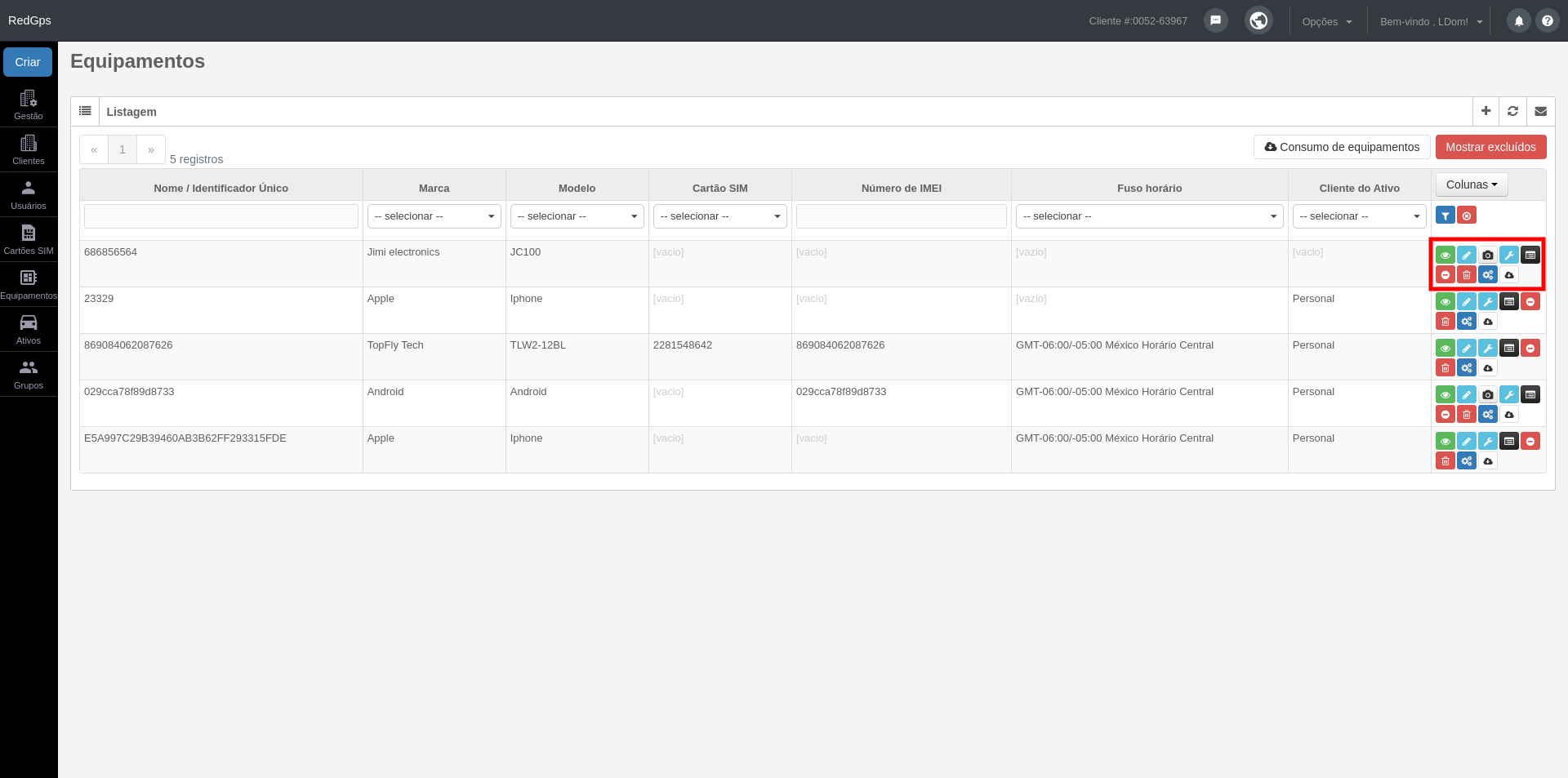
###### <span style="font-size: 12pt; font-family: Arial; color: #4a86e8; background-color: transparent; font-weight: bold; font-style: italic; font-variant: normal; text-decoration: none; vertical-align: baseline; white-space: pre-wrap;">Ações</span>

[![equipamientos 1.png](https://docs.redgps.com/uploads/images/gallery/2024-09/scaled-1680-/equipamientos-1.png)](https://docs.redgps.com/uploads/images/gallery/2024-09/equipamientos-1.png)

######  

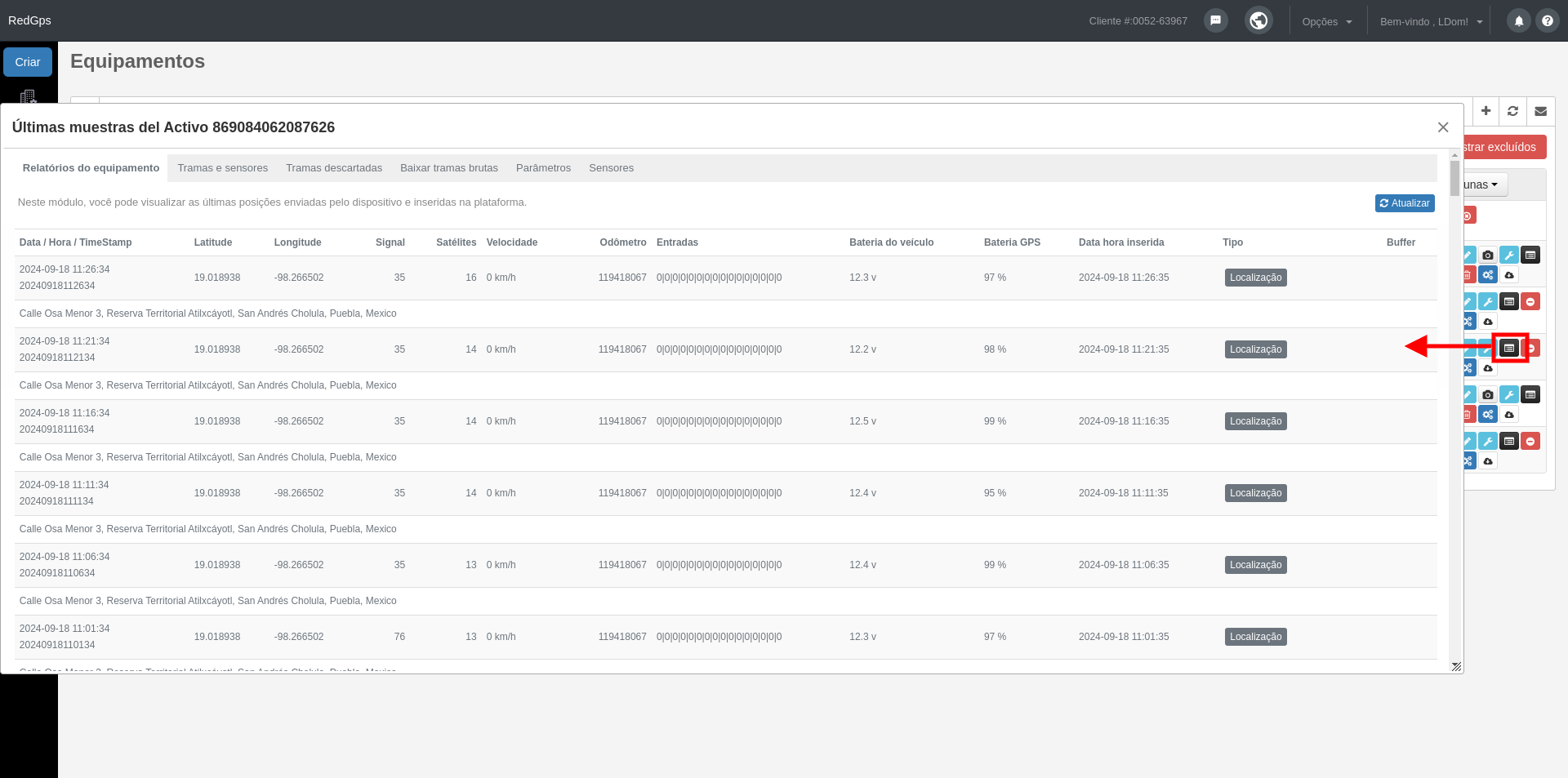
###### <span style="font-size: 11pt; font-family: Arial; color: #666666; background-color: transparent; font-weight: bold; font-style: italic; font-variant: normal; text-decoration: none; vertical-align: baseline; white-space: pre-wrap;"><span style="border: none; display: inline-block; overflow: hidden; width: 25px; height: 23px;">![](https://lh4.googleusercontent.com/i1r2FeYzGb-zU5TkUw5xN3QKBAOorT8X5TE_O0ZCOtsoDGvcVwkRsUS_hHNMW5lsx8toR3fF5kXzEmgYVCqkYePC-MAFtOl1rn55tHtOYSTjzU19J6xI_EPsOW4x0937YNrHBdOB "ver reportes")</span></span><span style="font-size: 11pt; font-family: Arial; color: #666666; background-color: transparent; font-weight: 400; font-style: italic; font-variant: normal; text-decoration: none; vertical-align: baseline; white-space: pre-wrap;">-</span><span style="font-size: 12pt; font-family: Arial; color: #666666; background-color: transparent; font-weight: bold; font-style: italic; font-variant: normal; text-decoration: none; vertical-align: baseline; white-space: pre-wrap;">Ver relatórios GPS</span>

<span style="font-size: 12pt; font-family: Arial; color: #333333; background-color: transparent; font-weight: 400; font-style: normal; font-variant: normal; text-decoration: none; vertical-align: baseline; white-space: pre-wrap;">Neste relatório você pode visualizar as amostras ou relatórios mais recentes do seu equipamento.</span>

[![equipamientos 2.png](https://docs.redgps.com/uploads/images/gallery/2024-09/scaled-1680-/equipamientos-2.png)](https://docs.redgps.com/uploads/images/gallery/2024-09/equipamientos-2.png)

<span style="text-decoration: underline; color: #0000ff;"><span style="font-size: 12pt; font-family: Arial; background-color: transparent; font-weight: 400; font-style: normal; font-variant: normal; text-decoration: none; vertical-align: baseline; white-space: pre-wrap;">[Más información Últimas muestras del Activo](https://docs.redgps.com/books/preguntas-frecuentes/page/ultimas-muestras-del-activo "Últimas muestras")</span></span>

###### <span style="font-size: 11pt; font-family: Arial; color: #666666; background-color: transparent; font-weight: 400; font-style: italic; font-variant: normal; text-decoration: none; vertical-align: baseline; white-space: pre-wrap;"><span style="border: none; display: inline-block; overflow: hidden; width: 21px; height: 21px;">![](https://lh5.googleusercontent.com/acxq4x9o3NuCD9kDz3lxEZQ5ZXou4MsJeYOq288lahSNgTG4o5ULVmZgcstrZa9ZTkf1YbrCeaeQ784w6fbr3TmvbpkAhRYJffcYH2oZEr5xzp6kqgw7f5BXto2UAwKzJ8ZYWMqP "eliminar")</span></span><span style="font-size: 12pt; font-family: Arial; color: #666666; background-color: transparent; font-weight: bold; font-style: italic; font-variant: normal; text-decoration: none; vertical-align: baseline; white-space: pre-wrap;">-</span><span style="font-size: 12pt; font-family: Arial; color: #666666; background-color: transparent; font-weight: bold; font-style: italic; font-variant: normal; text-decoration: none; vertical-align: baseline; white-space: pre-wrap;">Eliminar historial</span>

<span style="font-size: 12pt; font-family: Arial; color: #333333; background-color: transparent; font-weight: 400; font-style: normal; font-variant: normal; text-decoration: none; vertical-align: baseline; white-space: pre-wrap;">Esta ação elimina as últimas amostras do relatório do equipamento GPS.</span>

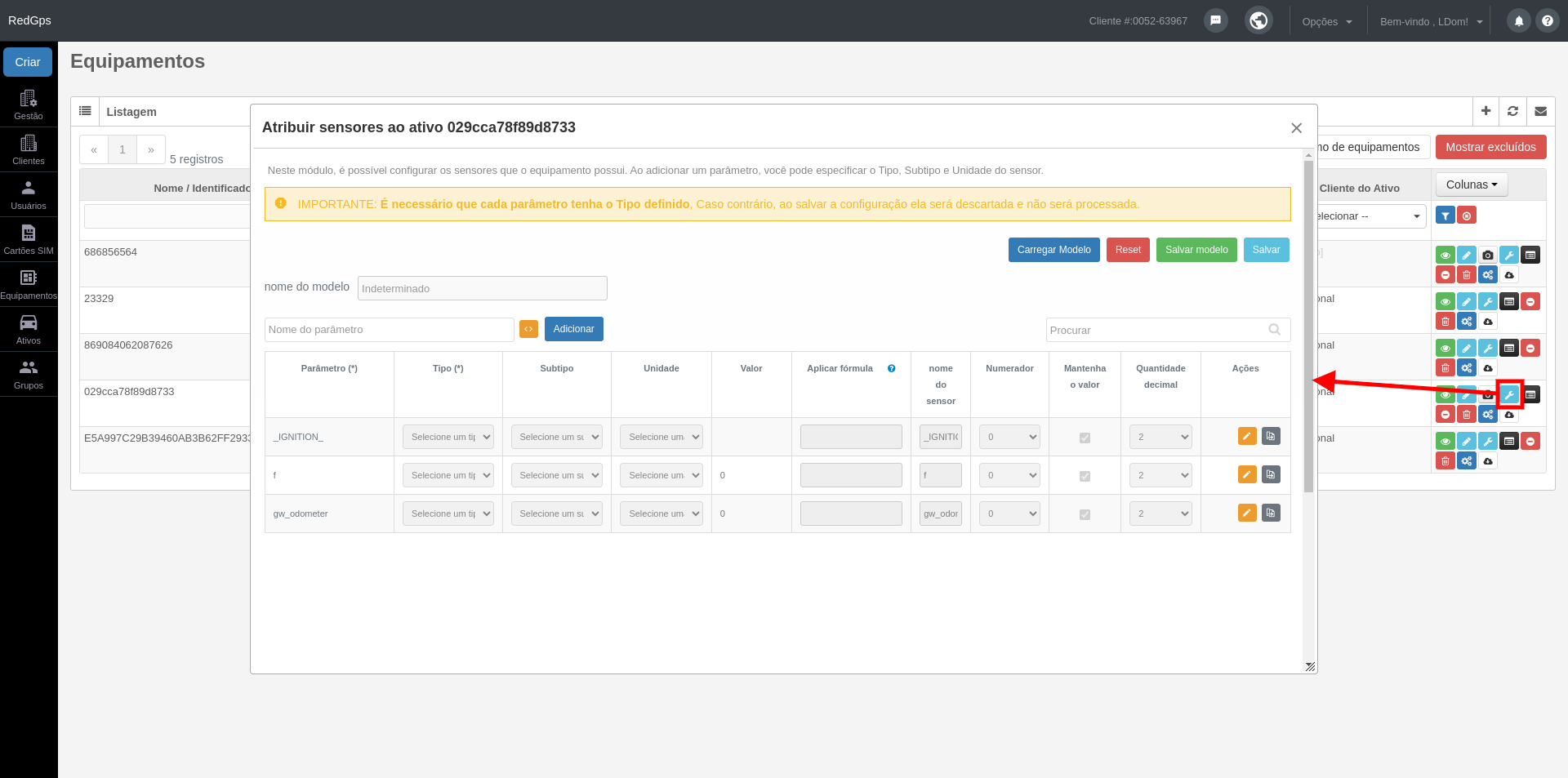
###### <span style="font-size: 12pt; font-family: Arial; color: #666666; background-color: transparent; font-weight: bold; font-style: italic; font-variant: normal; text-decoration: none; vertical-align: baseline; white-space: pre-wrap;"><span style="border: none; display: inline-block; overflow: hidden; width: 25px; height: 23px;">![](https://lh5.googleusercontent.com/UG4uwAd6YZzzQBfHyYXuB-REQgvmcm1HtG8WvtRKYz5LHAOkn_UxgUlRDzn9_oY1HoHcZh3-sgcnteI6ysny-djqlnE841tb5UZoUY0v-4PzGQ_uBBA7tKI05_McS3e-CII0_uz6 "ver reportes")</span></span><span style="font-size: 12pt; font-family: Arial; color: #666666; background-color: transparent; font-weight: bold; font-style: italic; font-variant: normal; text-decoration: none; vertical-align: baseline; white-space: pre-wrap;">-</span><span style="font-size: 12pt; font-family: Arial; color: #666666; background-color: transparent; font-weight: bold; font-style: italic; font-variant: normal; text-decoration: none; vertical-align: baseline; white-space: pre-wrap;">Planilha de sensores</span>

<span style="font-size: 12pt; font-family: Arial; color: #333333; background-color: #ffffff; font-weight: 400; font-style: normal; font-variant: normal; text-decoration: none; vertical-align: baseline; white-space: pre-wrap;">Este módulo permite configurar os sensores que seu equipamento possui. Configurar o tipo, subtipo e unidade; Você deve clicar no nome do parâmetro. Todos os sensores configurados (OBD II, CANBUS, Entradas, Temperatura, etc.) podem ser visualizados em Detalhe Avançado da plataforma mapa.</span>

[![equipamiento 3.png](https://docs.redgps.com/uploads/images/gallery/2024-09/scaled-1680-/equipamiento-3.png)](https://docs.redgps.com/uploads/images/gallery/2024-09/equipamiento-3.png)

<span style="text-decoration: underline;"><span style="color: #0000ff;">[Más información Asignar sensores al Activo](https://docs.redgps.com/books/preguntas-frecuentes/page/configuracion-de-sensores)</span></span>

###### <span style="font-size: 11pt; font-family: Arial; color: #666666; background-color: transparent; font-weight: 400; font-style: italic; font-variant: normal; text-decoration: none; vertical-align: baseline; white-space: pre-wrap;"><span style="border: none; display: inline-block; overflow: hidden; width: 25px; height: 23px;">![](https://lh4.googleusercontent.com/Lw_YGxIGgYA9J6v50_js3UjdnOJw9Cg5yn35aIoO1l3MeiLDlHPRW8LhzjsAQ-ST0IkOw4dGVXBOXf8-x0wQFZSf89EC8oimKYff2Rjaxj-CjWms1ZqIKWB_NTuavoLvVK2p0LCj "ver reportes")</span></span><span style="font-size: 11pt; font-family: Arial; color: #666666; background-color: transparent; font-weight: 400; font-style: italic; font-variant: normal; text-decoration: none; vertical-align: baseline; white-space: pre-wrap;">-</span><span style="font-size: 12pt; font-family: Arial; color: #666666; background-color: transparent; font-weight: bold; font-style: italic; font-variant: normal; text-decoration: none; vertical-align: baseline; white-space: pre-wrap;">Atribuir modelo de </span><span style="font-size: 12pt; font-family: Arial; color: #666666; background-color: transparent; font-weight: bold; font-style: italic; font-variant: normal; text-decoration: none; vertical-align: baseline; white-space: pre-wrap;">inputs </span>

<span style="font-size: 12pt; font-family: Arial; color: #333333; background-color: transparent; font-weight: 400; font-style: normal; font-variant: normal; text-decoration: none; vertical-align: baseline; white-space: pre-wrap;">Se o gateway que seu dispositivo utiliza não tiver as entradas configuradas ou você quiser personalizá-lo, deverá gerar um novo modelo de entrada.</span>

Na primeira aba, são listados os modelos que você criou. Na coluna "Selecionar", você pode marcar o modelo que será atribuído à equipe.

[![equipamiento 4ç.png](https://docs.redgps.com/uploads/images/gallery/2024-09/scaled-1680-/equipamiento-4c.png)](https://docs.redgps.com/uploads/images/gallery/2024-09/equipamiento-4c.png)
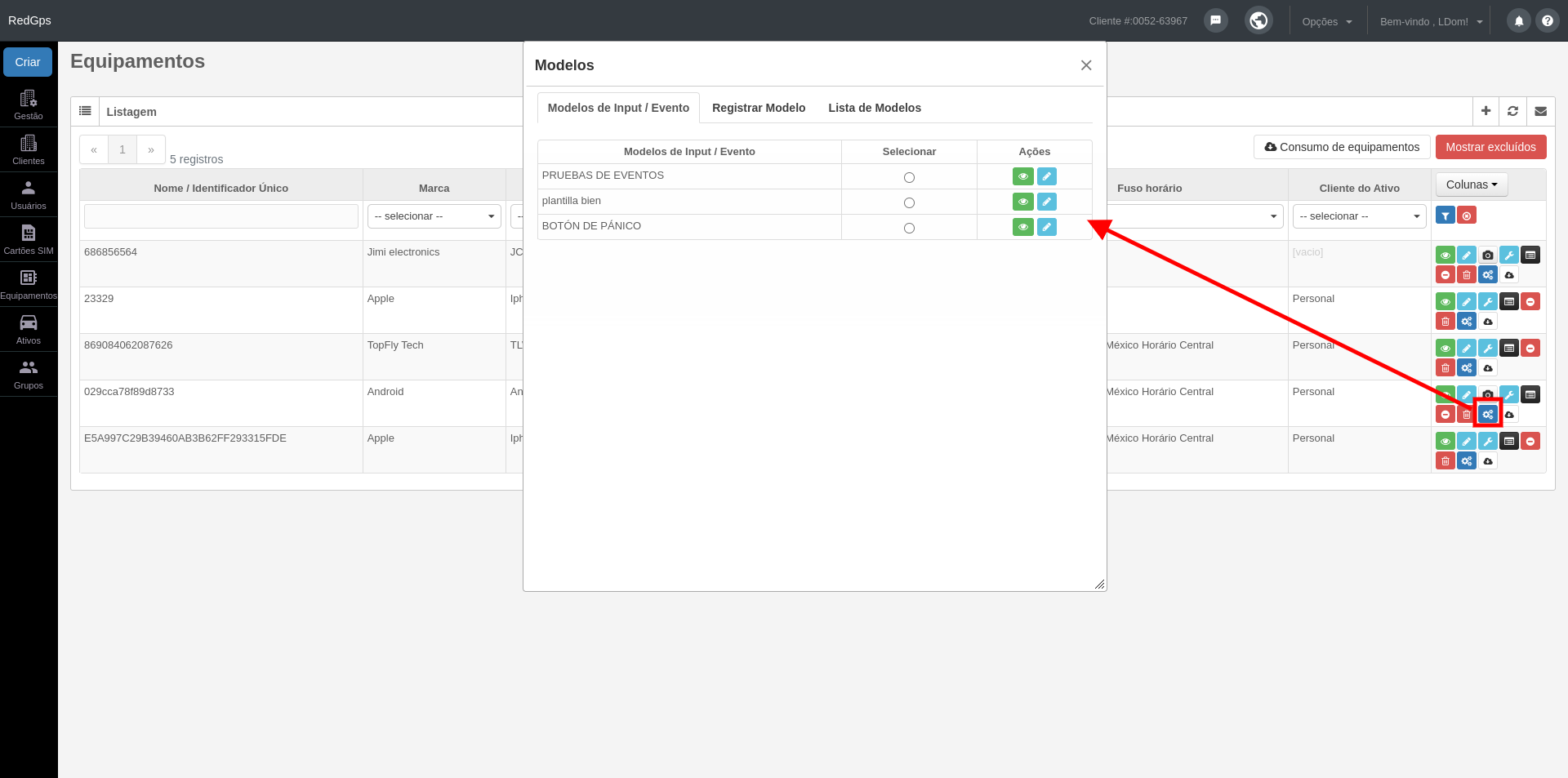
Você também poderá visualizar os valores inseridos em cada modelo com o botão "Visualizar detalhes" e editá-los com o botão "Editar modelo".

Para criar um modelo, você deve acessar a segunda aba "Registrar Modelo". Nessa seção, poderá identificar o modelo com o nome desejado e, em seguida, usar o botão "Adicionar entrada" para definir os inputs e/ou parâmetros, junto com o valor que espera receber para gerar o evento selecionado.

[![equipamiento 5.png](https://docs.redgps.com/uploads/images/gallery/2024-09/scaled-1680-/equipamiento-5.png)](https://docs.redgps.com/uploads/images/gallery/2024-09/equipamiento-5.png)
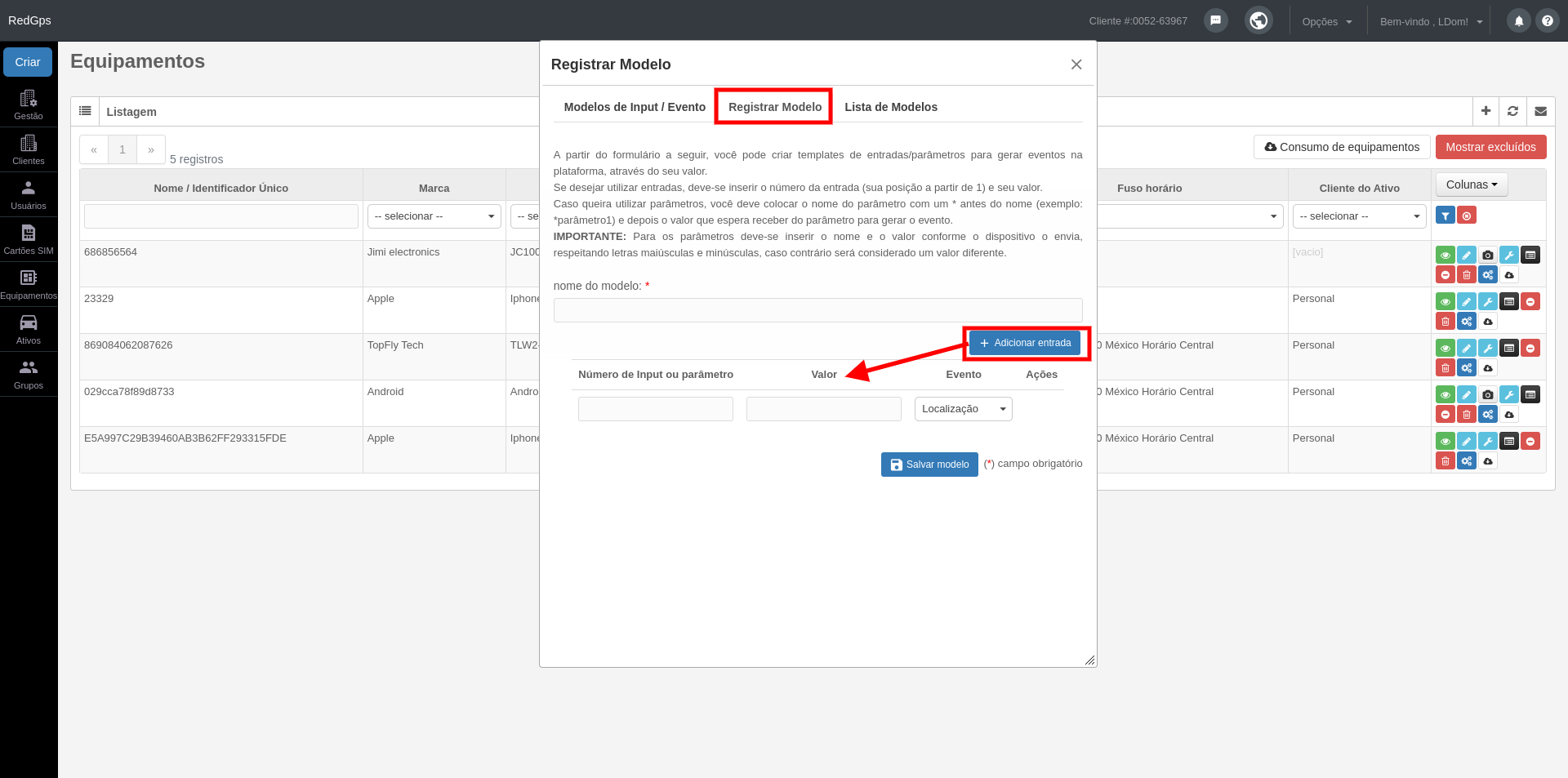
- Se você quiser utilizar inputs, deve inserir o número do input (sua posição começando de 1) e seu valor.
- Se quiser utilizar parâmetros, deve colocar o nome do parâmetro com um \* antes do nome (exemplo: \*parametro1) e, em seguida, o valor que espera receber do parâmetro para gerar o evento. **IMPORTANTE**: Você deve inserir o nome e o valor exatamente como enviados pela equipe, respeitando letras maiúsculas e minúsculas, pois, caso contrário, será considerado um valor diferente.

Na aba "Lista de Modelos", você poderá visualizar a lista de modelos criados e excluídos.

[![equipamiento 6.png](https://docs.redgps.com/uploads/images/gallery/2024-09/scaled-1680-/equipamiento-6.png)](https://docs.redgps.com/uploads/images/gallery/2024-09/equipamiento-6.png)
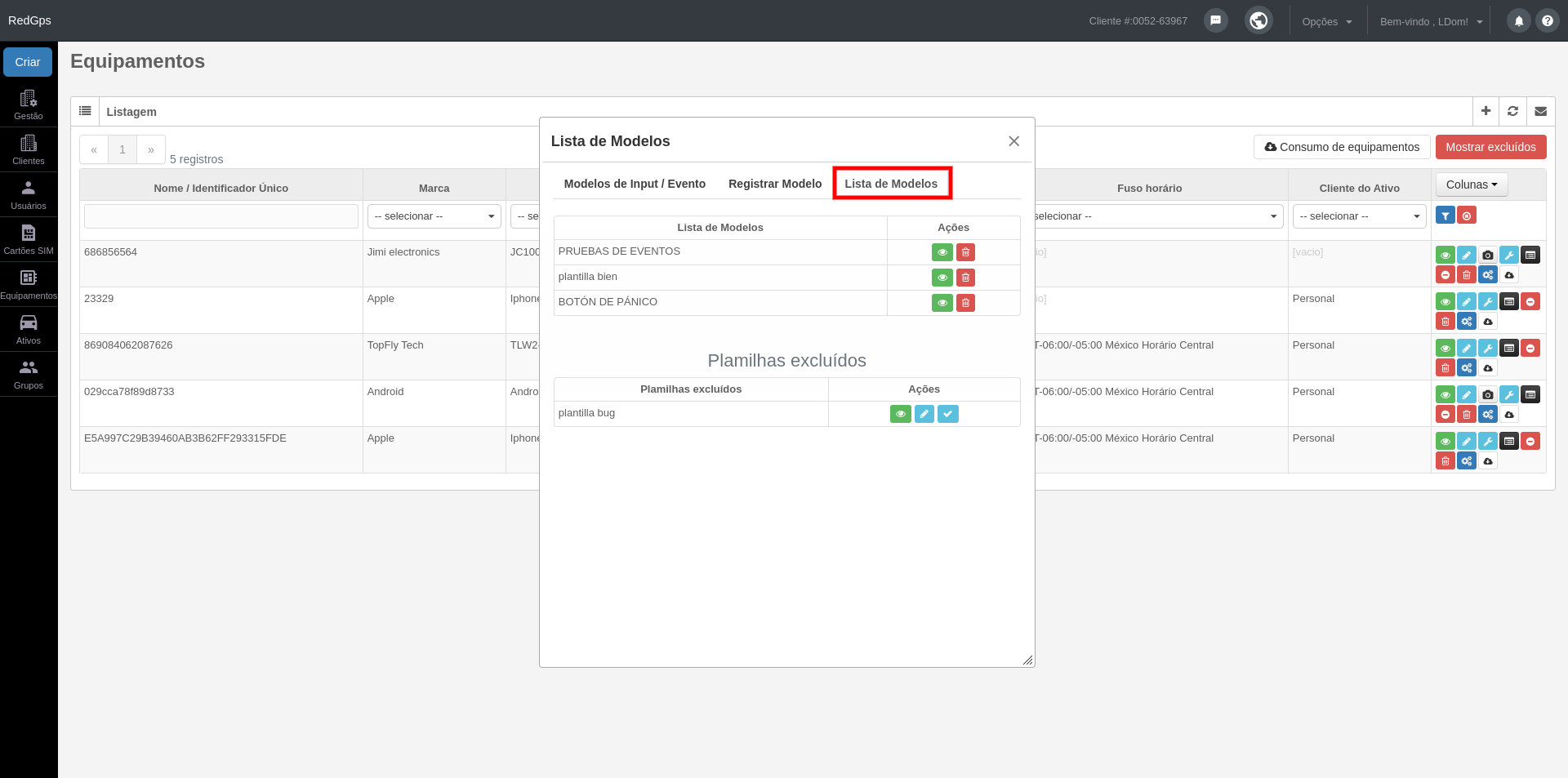
Você poderá visualizar os valores inseridos em cada modelo com o botão "Visualizar detalhes" e as modelos que foram excluídos poderão ser recuperados com o botão "Restaurar modelo".

######  

###### <span style="font-size: 11pt; font-family: Arial; color: #666666; background-color: transparent; font-weight: bold; font-style: italic; font-variant: normal; text-decoration: none; vertical-align: baseline; white-space: pre-wrap;"><span style="border: none; display: inline-block; overflow: hidden; width: 25px; height: 23px;">![](https://lh5.googleusercontent.com/FzdMbnGlK1QGVuS8YCZdzQ7LEhXXi6mdIH-_Pl_Qi1ABUnwWE5ponuRZQeH4SSgCTX_XE_Le0sUkmFsbyjsAiCsztZcMlqzfvzTgq9VOTMAU1GtdA1lKCcp9Cqb0WNjwaO1fkDUm "ver reportes")</span></span><span style="font-size: 11pt; font-family: Arial; color: #666666; background-color: transparent; font-weight: 400; font-style: italic; font-variant: normal; text-decoration: none; vertical-align: baseline; white-space: pre-wrap;">-</span><span style="font-size: 12pt; font-family: Arial; color: #666666; background-color: transparent; font-weight: bold; font-style: italic; font-variant: normal; text-decoration: none; vertical-align: baseline; white-space: pre-wrap;">Consumo del equipamentos</span>

<span style="font-size: 12pt; font-family: Arial; color: #333333; background-color: transparent; font-weight: 400; font-style: normal; font-variant: normal; text-decoration: none; vertical-align: baseline; white-space: pre-wrap;">Nesta opção você pode ver o consumo do seu dispositivo em termos de Mb e unidades dos seus dados e relatórios GPRS.</span>

###### <span style="font-size: 11pt; font-family: Arial; color: #666666; background-color: transparent; font-weight: bold; font-style: italic; font-variant: normal; text-decoration: none; vertical-align: baseline; white-space: pre-wrap;"><span style="border: none; display: inline-block; overflow: hidden; width: 25px; height: 23px;">![](https://lh6.googleusercontent.com/zRkx1i25PHVNAA99PWLKBfts37-Jdio8N9pwUo8qI4XPbUZXmHnBy8dirIu0J9oKCOLKK_FhpZCOYBrfV26P-0FezKYfSYhASnDLfW05TFs32NjnL85KQnH5OXvpFcFEPB1ebv_k "ver reportes")</span></span><span style="font-size: 12pt; font-family: Arial; color: #666666; background-color: transparent; font-weight: bold; font-style: italic; font-variant: normal; text-decoration: none; vertical-align: baseline; white-space: pre-wrap;">-</span><span style="font-size: 12pt; font-family: Arial; color: #666666; background-color: transparent; font-weight: bold; font-style: italic; font-variant: normal; text-decoration: none; vertical-align: baseline; white-space: pre-wrap;">Retiradas de equipamentos – licenças</span>

###### <span style="font-size: 12pt; font-family: Arial; color: #000000; background-color: transparent; font-weight: 400; font-style: normal; font-variant: normal; text-decoration: none; vertical-align: baseline; white-space: pre-wrap;">Agora você mesmo pode excluir as licenças do seu dispositivo, terá a facilidade de transferir as informações armazenadas no dispositivo que deseja excluir para outro dispositivo que esteja ativo; ou simplesmente eliminar a informação associada ao equipamento que será dado de baixa.</span>

<span style="font-size: 12pt; font-family: Arial; color: #333333; background-color: transparent; font-weight: 400; font-style: normal; font-variant: normal; text-decoration: none; vertical-align: baseline; white-space: pre-wrap;">Ao clicar no ícone de exclusão, um modal será exibido com as opções que você pode fazer para excluir o equipamento. É **IMPORTANTE** que você esteja ciente de que no momento do cancelamento, os dados históricos do equipamento serão excluídos permanentemente do sistema e **não poderão ser recuperados.**</span>