# Rutas

## <span style="font-size: 16pt; font-family: Arial; color: #000000; background-color: transparent; font-weight: 400; font-style: normal; font-variant: normal; text-decoration: none; vertical-align: baseline; white-space: pre-wrap;">Configuración de despacho rutas</span>

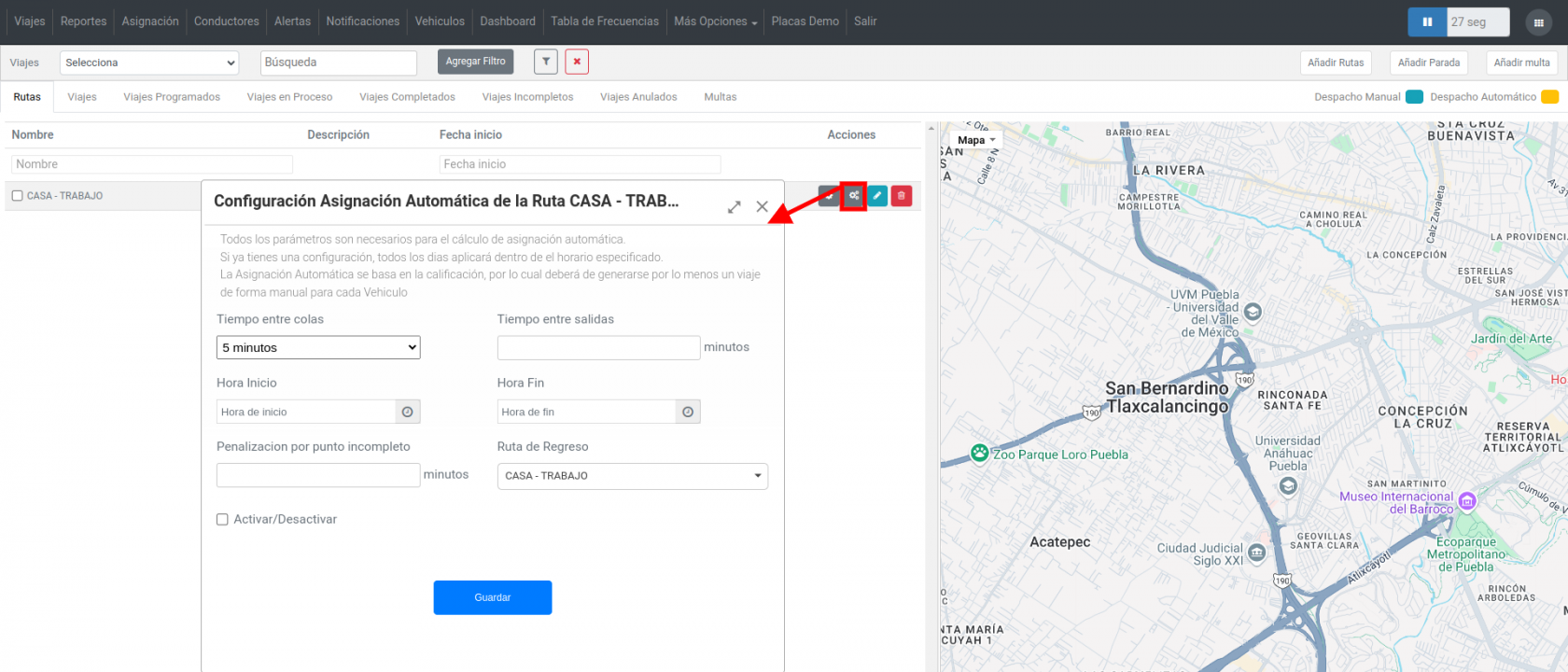
<span style="font-size: 12pt; font-family: Arial; color: #333333; background-color: transparent; font-weight: 400; font-style: normal; font-variant: normal; text-decoration: none; vertical-align: baseline; white-space: pre-wrap;">Dentro de OnBus, en la opción </span><span style="font-size: 12pt; font-family: Arial; color: #333333; background-color: transparent; font-weight: bold; font-style: italic; font-variant: normal; text-decoration: none; vertical-align: baseline; white-space: pre-wrap;">rutas</span><span style="font-size: 12pt; font-family: Arial; color: #333333; background-color: transparent; font-weight: 400; font-style: normal; font-variant: normal; text-decoration: none; vertical-align: baseline; white-space: pre-wrap;"> aparece un nuevo botón color gris de configuración por cada ruta.</span>

<span style="font-size: 12pt; font-family: Arial; color: #333333; background-color: transparent; font-weight: 400; font-style: normal; font-variant: normal; text-decoration: none; vertical-align: baseline; white-space: pre-wrap;">Este botón permitirá poder configurar los parámetros para el despacho automático como se puede ver en la siguiente imagen:</span>

[![rutas 1.png](https://docs.redgps.com/uploads/images/gallery/2024-12/scaled-1680-/rutas-1.png)](https://docs.redgps.com/uploads/images/gallery/2024-12/rutas-1.png)

- - - <span style="font-size: 12pt; font-family: Arial; color: #666666; background-color: transparent; font-weight: bold; font-style: italic; font-variant: normal; text-decoration: none; vertical-align: baseline; white-space: pre-wrap;">Tiempo entre colas:</span><span style="font-size: 12pt; font-family: Arial; color: #666666; background-color: transparent; font-weight: 400; font-style: normal; font-variant: normal; text-decoration: none; vertical-align: baseline; white-space: pre-wrap;"> El tiempo entre colas son pequeños grupos de autobuses que fueron llegando a la base en un cierto tiempo.</span>

<span style="font-size: 12pt; font-family: Arial; color: #333333; background-color: transparent; font-weight: bold; font-style: italic; font-variant: normal; text-decoration: none; vertical-align: baseline; white-space: pre-wrap;">Ejemplo:</span><span style="font-size: 12pt; font-family: Arial; color: #333333; background-color: transparent; font-weight: 400; font-style: normal; font-variant: normal; text-decoration: none; vertical-align: baseline; white-space: pre-wrap;"> Tiempo entre colas: 10 Min 5:00 AM – 5:10 AM 5:10 AM – 5:20 AM 5:20 AM – 5:30</span>

<span style="font-size: 12pt; font-family: Arial; color: #333333; background-color: transparent; font-weight: 400; font-style: normal; font-variant: normal; text-decoration: none; vertical-align: baseline; white-space: pre-wrap;">En este ejemplo podemos ver que con un tiempo entre colas de 10 minutos pueden llegar 4, 3 o 1 unidad a la base.</span>

<span style="font-size: 12pt; font-family: Arial; color: #333333; background-color: transparent; font-weight: 400; font-style: normal; font-variant: normal; text-decoration: none; vertical-align: baseline; white-space: pre-wrap;">En el caso de los grupos que tienen más de una unidad se escogerá el que tenga mejor calificación y lo despacha al finalizar el tiempo del grupo es decir 5:10 AM.</span>

<span style="font-size: 12pt; font-family: Arial; color: #333333; background-color: transparent; font-weight: bold; font-style: italic; font-variant: normal; text-decoration: none; vertical-align: baseline; white-space: pre-wrap;">Importante: Para poder realizar el despacho del siguiente grupo todas las unidades del grupo anterior ya debieron ser despachadas.</span>

- - - <span style="font-size: 12pt; font-family: Arial; color: #666666; background-color: transparent; font-weight: bold; font-style: italic; font-variant: normal; text-decoration: none; vertical-align: baseline; white-space: pre-wrap;">Tiempo entre salidas:</span><span style="font-size: 12pt; font-family: Arial; color: #666666; background-color: transparent; font-weight: 400; font-style: normal; font-variant: normal; text-decoration: none; vertical-align: baseline; white-space: pre-wrap;"> El tiempo entre salidas es el tiempo en que se estará despachando cada autobús, como se explicaba en el ejemplo anterior, si el primer autobús se despacha a las 5:10 y se selecciona que cada autobús se debe despachar cada 15 minutos el segundo será despachado a las 5:25 AM.</span>
        - <span style="font-size: 12pt; font-family: Arial; color: #666666; background-color: transparent; font-weight: bold; font-style: italic; font-variant: normal; text-decoration: none; vertical-align: baseline; white-space: pre-wrap;">Hora Inicio – Hora Fin:</span><span style="font-size: 12pt; font-family: Arial; color: #666666; background-color: transparent; font-weight: 400; font-style: normal; font-variant: normal; text-decoration: none; vertical-align: baseline; white-space: pre-wrap;"> A partir de qué horario la plataforma debe empezar a generar grupos y a partir de que horario debe dejar de crearlos. </span>
        - <span style="font-size: 12pt; font-family: Arial; color: #666666; background-color: transparent; font-weight: 400; font-style: normal; font-variant: normal; text-decoration: none; vertical-align: baseline; white-space: pre-wrap;">**Penalización por punto incompleto:** La penalización por punto incompleto es un apartado opcional en el cual puede establecer qué tiempo negativo será cargado al conductor en caso de no pasar por alguna parada.</span>
        - <span style="font-size: 12pt; font-family: Arial; color: #666666; background-color: transparent; font-weight: bold; font-style: italic; font-variant: normal; text-decoration: none; vertical-align: baseline; white-space: pre-wrap;">Ruta de regreso:</span><span style="font-size: 12pt; font-family: Arial; color: #666666; background-color: transparent; font-weight: 400; font-style: normal; font-variant: normal; text-decoration: none; vertical-align: baseline; white-space: pre-wrap;"> Es la ruta que tomará para poder regresar nuevamente a la misma base.</span>
        - <span style="font-size: 12pt; font-family: Arial; color: #666666; background-color: transparent; font-weight: bold; font-style: italic; font-variant: normal; text-decoration: none; vertical-align: baseline; white-space: pre-wrap;">Activar/desactivar:</span><span style="font-size: 12pt; font-family: Arial; color: #666666; background-color: transparent; font-weight: 400; font-style: normal; font-variant: normal; text-decoration: none; vertical-align: baseline; white-space: pre-wrap;"> Sirve para activar o desactivar la configuración del despacho automático.</span>

<span id="bkmrk-%C2%A0-1" style="font-weight: normal;"></span>