# Añadir Rutas

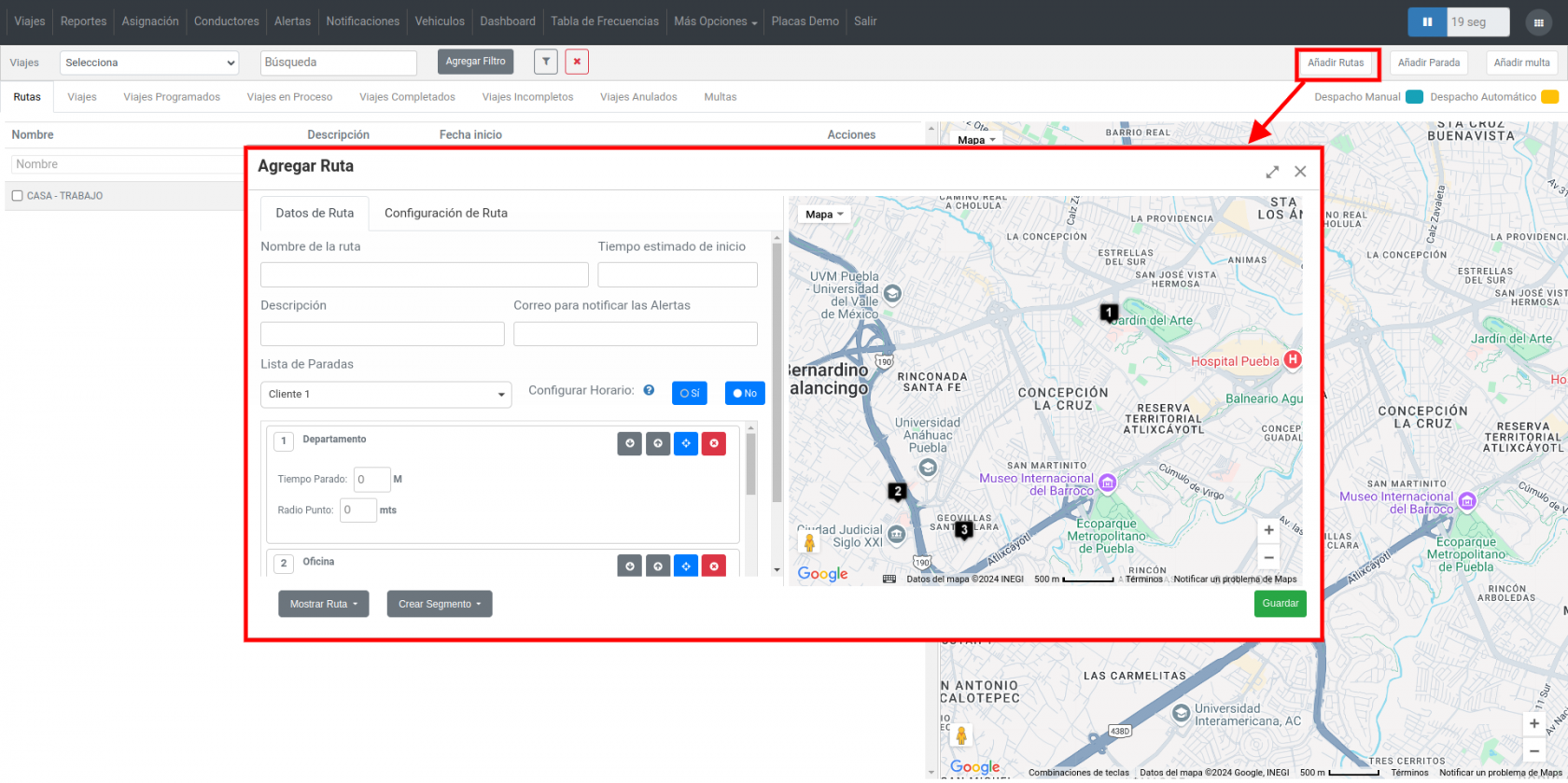
<span style="font-size: 11pt; font-family: Arial; color: #000000; background-color: transparent; font-weight: 400; font-style: normal; font-variant: normal; text-decoration: none; vertical-align: baseline; white-space: pre-wrap;">En la pestaña </span><span style="font-size: 11pt; font-family: Arial; color: #000000; background-color: transparent; font-weight: bold; font-style: italic; font-variant: normal; text-decoration: none; vertical-align: baseline; white-space: pre-wrap;">“Viajes”</span><span style="font-size: 11pt; font-family: Arial; color: #000000; background-color: transparent; font-weight: 400; font-style: normal; font-variant: normal; text-decoration: none; vertical-align: baseline; white-space: pre-wrap;"> podremos crear rutas y paradas. Añadir Ruta: Aquí se agregará la ruta completa que deberá seguir un activo. Se podrán añadir lugares o Geocercas.</span>

- - - <span style="font-size: 12pt; font-family: Arial; color: #666666; background-color: transparent; font-weight: bold; font-style: italic; font-variant: normal; text-decoration: none; vertical-align: baseline; white-space: pre-wrap;">Nombre de ruta:</span><span style="font-size: 12pt; font-family: Arial; color: #666666; background-color: transparent; font-weight: 400; font-style: normal; font-variant: normal; text-decoration: none; vertical-align: baseline; white-space: pre-wrap;"> Ingrese el nombre que llevará la ruta.</span>
        - <span style="font-size: 12pt; font-family: Arial; color: #666666; background-color: transparent; font-weight: bold; font-style: normal; font-variant: normal; text-decoration: none; vertical-align: baseline; white-space: pre-wrap;">Tiempo estimado de inicio</span><span style="font-size: 12pt; font-family: Arial; color: #666666; background-color: transparent; font-weight: 400; font-style: normal; font-variant: normal; text-decoration: none; vertical-align: baseline; white-space: pre-wrap;">: Será la fecha en la que iniciará la ruta.</span>
        - <span style="font-size: 12pt; font-family: Arial; color: #666666; background-color: transparent; font-weight: bold; font-style: italic; font-variant: normal; text-decoration: none; vertical-align: baseline; white-space: pre-wrap;">Descripción: </span><span style="font-size: 12pt; font-family: Arial; color: #666666; background-color: transparent; font-weight: 400; font-style: normal; font-variant: normal; text-decoration: none; vertical-align: baseline; white-space: pre-wrap;">Breve descripción de su ruta (opcional).</span>
        - <span style="font-size: 12pt; font-family: Arial; color: #666666; background-color: transparent; font-weight: bold; font-style: italic; font-variant: normal; text-decoration: none; vertical-align: baseline; white-space: pre-wrap;">Correo para notificar las alertas:</span><span style="font-size: 12pt; font-family: Arial; color: #666666; background-color: transparent; font-weight: 400; font-style: normal; font-variant: normal; text-decoration: none; vertical-align: baseline; white-space: pre-wrap;"> Ingrese el email en el que se estarán enviando las alertas generadas por los activos que estén en la ruta. Alertas: Selecciones las alertas que desea recibir mientras la ruta se está ejecutando.</span>
        - <span style="font-size: 12pt; font-family: Arial; color: #666666; background-color: transparent; font-weight: bold; font-style: italic; font-variant: normal; text-decoration: none; vertical-align: baseline; white-space: pre-wrap;">Lista de paradas:</span><span style="font-size: 12pt; font-family: Arial; color: #666666; background-color: transparent; font-weight: 400; font-style: normal; font-variant: normal; text-decoration: none; vertical-align: baseline; white-space: pre-wrap;"> Seleccione lugares y geocercas que representarán las paradas que tendrá la ruta. Aquí podrá definir tiempos de tolerancia para llegar a la parada, la hora en la que se deberá llegar, el tiempo que el activo podrá estar parado, etc.</span>
        - <span style="font-size: 12pt; font-family: Arial; color: #666666; background-color: transparent; font-weight: bold; font-style: italic; font-variant: normal; text-decoration: none; vertical-align: baseline; white-space: pre-wrap;">Configurar horario: </span><span style="font-size: 12pt; font-family: Arial; color: #666666; background-color: transparent; font-weight: 400; font-style: normal; font-variant: normal; text-decoration: none; vertical-align: baseline; white-space: pre-wrap;">Se asigna una hora específica de llegada de cada una de las paradas (hora de llegada).</span>

<span style="font-size: 12pt; font-family: Arial; color: #333333; background-color: transparent; font-weight: 400; font-style: normal; font-variant: normal; text-decoration: none; vertical-align: baseline; white-space: pre-wrap;">Esos son los datos básicos para crear una ruta, al final haga clic en el botón “Guardar” para que pueda visualizar esta ruta en “Rutas”.</span>

[![onbus esp.png](https://docs.redgps.com/uploads/images/gallery/2024-11/scaled-1680-/onbus-esp.png)](https://docs.redgps.com/uploads/images/gallery/2024-11/onbus-esp.png)

<span style="font-size: 12pt; font-family: Arial; color: #333333; background-color: transparent; font-weight: 400; font-style: normal; font-variant: normal; text-decoration: none; vertical-align: baseline; white-space: pre-wrap;">Como acciones adicionales podrá:</span>

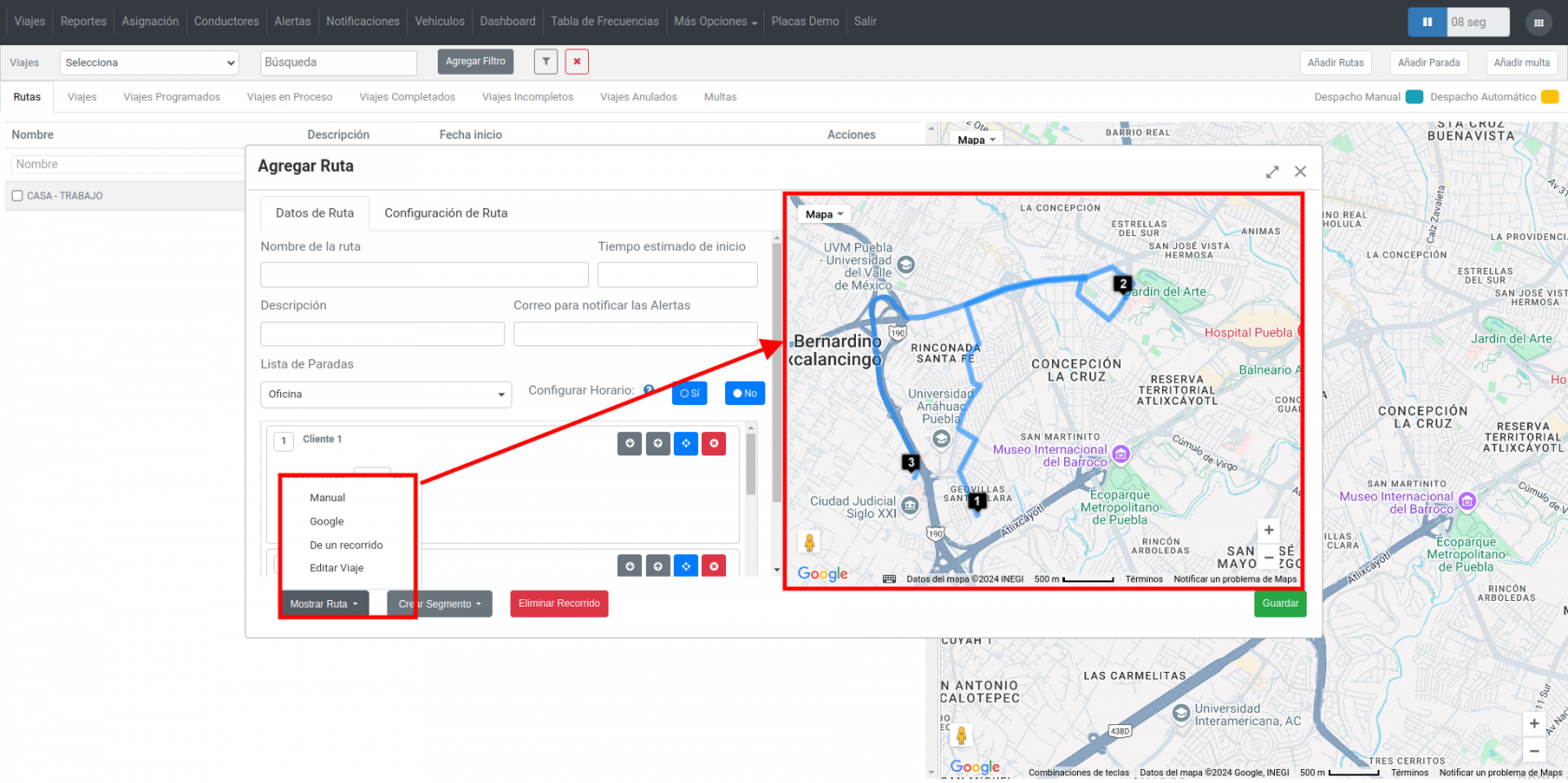
- - - <span style="font-size: 12pt; font-family: Arial; color: #666666; background-color: transparent; font-weight: bold; font-style: italic; font-variant: normal; text-decoration: none; vertical-align: baseline; white-space: pre-wrap;">Mostrar Ruta:</span><span style="font-size: 12pt; font-family: Arial; color: #666666; background-color: transparent; font-weight: 400; font-style: normal; font-variant: normal; text-decoration: none; vertical-align: baseline; white-space: pre-wrap;"> Podrá visualizar el recorrido de su ruta entre los puntos seleccionados como paradas, tiene la opción de elegir el recorrido manual, detectado por Google, de otro recorrido o editar el viaje.</span>

[![onbus 2.png](https://docs.redgps.com/uploads/images/gallery/2024-11/scaled-1680-/Uijonbus-2.png)](https://docs.redgps.com/uploads/images/gallery/2024-11/Uijonbus-2.png)

- - - <span style="font-size: 12pt; font-family: Arial; color: #666666; background-color: transparent; font-weight: bold; font-style: italic; font-variant: normal; text-decoration: none; vertical-align: baseline; white-space: pre-wrap;">Crear Segmento:</span><span style="font-size: 12pt; font-family: Arial; color: #666666; background-color: transparent; font-weight: 400; font-style: normal; font-variant: normal; text-decoration: none; vertical-align: baseline; white-space: pre-wrap;"> Son pequeñas fragmentos de la ruta en donde podemos crear acciones específicas o se pueden crear parámetros, por ejemplo bajar la velocidad en un punto específico, abrir o cerrar puertas, ignición Off y On.</span>